
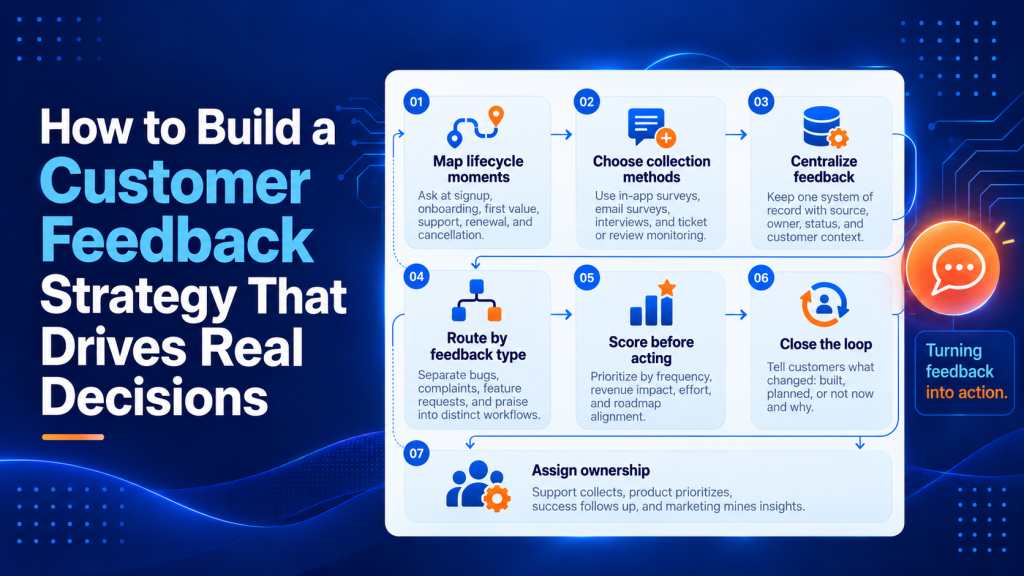
A customer feedback strategy that actually changes how your team operates is rare. Most companies collect feedback. Far fewer do anything useful with it.
The gap between “we listen to our customers” and “we built a system that turns their input into better decisions” is where revenue leaks out. Below are seven concrete approaches to close that gap, organized so you can pick the ones that fit your team’s stage and resources.
Key Points
- A real customer feedback strategy covers the full loop: how you collect input, where it lives, who triages it, how you decide what to act on, and how you tell customers what changed, because without that full chain feedback becomes noise that support drowns in and customers stop providing.
- Map feedback collection to specific lifecycle moments like signup, onboarding completion, first value milestone, support interaction, renewal, and cancellation, because asking right after onboarding captures friction while it’s fresh whereas asking six weeks later gets you a shrug.
- Score each feedback request across four dimensions using a simple 1-to-5 scale: how many customers mention it, how much revenue those customers represent, how hard it is to build, and whether it fits your current roadmap direction, so product managers have something defensible when they say “not now” instead of letting the loudest voice pick the roadmap.
- Close the loop by emailing customers directly when you implement their suggestion with three templates: one for “we built it,” one for “we’re planning it,” and one for “we heard you, but here’s why we’re going a different direction,” because that third template earns more respect than silence and turns submitters into advocates.
- Assign clear ownership across teams so support collects and tags, product triages and prioritizes, customer success closes the loop, and marketing mines feedback for positioning, because when the answer is “everyone” or “the support team, I guess,” feedback falls into a shared inbox that everyone assumes someone else monitors.
- Track operational metrics like survey response rate, average time from submission to acknowledgment, percentage of feedback items that result in a shipped change, and feature adoption rate after implementation, because a high NPS with a low survey response rate means you’re hearing from only a sliver of your base.
What Is Customer Feedback Strategy?
It’s not a survey. It’s not a spreadsheet of NPS scores.
A real strategy covers the full loop: how you collect input, where it lives, who triages it, how you decide what to act on, and how you tell customers what changed.
Without that full chain, feedback becomes noise.
Your support team drowns in tickets, product managers cherry-pick anecdotes, and customers stop bothering to respond because nothing visibly improves.
That context matters before you pick tactics.
Each idea below addresses a different link in that chain.

Building a customer feedback strategy that drives decisions
1. Map collection to lifecycle moments
Timing determines whether you get honest signal or polite silence.
Asking for feedback right after onboarding completion captures friction while it’s fresh.
Asking the same question six weeks later gets you a shrug.
Build a simple grid.
Include signup, onboarding, first value milestone, support interaction, renewal, and cancellation.
Assign one feedback mechanism to each moment.
Post-purchase emails work at some stages.
In-app micro-surveys work at others.
The point is coverage without overlap.
Start by identifying your product’s critical moments where user intent is clearest.
At signup, you learn why someone chose your product over alternatives.
During onboarding, you see where confusion or friction derails progress.
The first value milestone reveals whether your product delivered on its promise quickly enough.
Support interactions surface pain points that your interface failed to prevent.
Renewal conversations expose whether the product became essential or remained nice-to-have.
Cancellation feedback, when you can get it, tells you what you missed earlier.
Match your collection method to the cognitive load of each moment.
During onboarding, keep surveys to a single question with a five-point scale and an optional comment box.
Users are focused on getting set up, so respect their attention.
After a support resolution, you can ask two or three questions because the interaction is complete and they’re already engaged with your team.
At renewal, a longer survey or a brief call makes sense because the relationship is established and the stakes are higher.
Automate triggers based on user behavior rather than arbitrary time intervals.
Send your onboarding survey when someone completes the setup checklist, reaches their third login, or uses a core feature for the first time, whichever comes first.
Trigger your value milestone survey when usage data shows they’ve achieved a meaningful outcome, such as sending their first campaign, closing their first deal in your CRM, or publishing their first report.
Behavioral triggers catch users at moments of clarity, while calendar-based surveys catch them whenever the timer runs out.
Segment your feedback requests by user type and plan tier.
Enterprise customers expect and tolerate more touchpoints because they have dedicated account managers and higher stakes.
Self-service users on free or low-cost plans need lighter-touch requests or they’ll tune you out.
Adjust your survey frequency and depth accordingly, and track response rates by segment so you know when you’ve crossed into survey fatigue.
Document your lifecycle map in a shared space where support, product, marketing, and customer success can see it.
Include the trigger condition, the survey tool or method, the question set, who owns the follow-up, and the target response rate.
Update it quarterly as you learn which moments yield the highest-quality feedback and which yield noise.
A word of caution: don’t survey every touchpoint at once.
Start with two high-signal moments and expand quarterly.
2. How to collect customer feedback
The method you choose shapes the quality and volume of responses you receive.
Match your collection approach to where customers are in their journey and what kind of input you need.
In-app micro-surveys catch users while they’re actively engaged.
Trigger a single question after they complete a key action or spend time on a specific feature.
Keep it to one or two questions maximum.
Tools like Hotjar, Pendo, or even a simple modal built into your product work well here.
Design your in-app surveys to feel like a natural part of the interface rather than an interruption.
Use a slide-in panel or a subtle banner at the top of the screen instead of a modal that blocks the workflow.
Phrase questions in plain language tied to the action they just completed.
Ask “Was this report helpful?” or “Did you find what you were looking for?” rather than generic satisfaction scales.
Limit display frequency so the same user doesn’t see the same survey more than once every 30 days unless they’ve completed a different milestone.
Post-interaction email surveys work best immediately after onboarding, a support resolution, or a purchase.
Send within 24 hours while the experience is fresh.
Use a clear subject line like “How did we do?” and keep the survey under two minutes.
A five-point scale question followed by an optional open text field gives you both quantitative and qualitative data.
Personalize the email with the specific interaction you’re asking about.
Reference the support ticket number, the feature they just activated, or the plan they purchased.
Include a one-click rating option directly in the email body so respondents can answer without opening a separate survey tool.
For those who click through, keep the full survey to five questions or fewer, and make at least half of them optional.
Always include an open-ended “Anything else?” question at the end because that’s where customers tell you what you didn’t think to ask.
Customer interviews provide depth that surveys cannot.
Schedule 20- to 30-minute calls with customers who represent different segments, usage patterns, or satisfaction levels.
Prepare a loose script with open-ended questions, then let the conversation flow.
Record and transcribe these calls so you can mine them later for exact language customers use to describe problems.
Recruit interview participants strategically.
Target power users who’ve been with you for at least six months and have high engagement metrics, because they can articulate what works and what’s missing.
Also recruit recent churned customers or those who downgraded, because they’ll tell you what broke.
Offer a small incentive like a gift card or account credit to respect their time, and make scheduling frictionless with a tool like Calendly.
Structure your interview script around jobs-to-be-done rather than feature requests.
Ask what they were trying to accomplish when they chose your product, what alternatives they considered, what obstacles they hit during onboarding, and what they’d do differently if they started over.
Probe for specifics when they mention a pain point.
Ask “Can you walk me through the last time that happened?” or “What did you try before you contacted support?”
The goal is to understand context and causation, which surveys rarely capture.
Support ticket and chat analysis turns existing conversations into feedback without asking customers to do extra work.
Tag tickets by theme (bug, feature request, onboarding friction, billing question) and review patterns monthly.
Your support team already hears complaints and suggestions; make sure that intelligence reaches product and leadership.
Build a tagging taxonomy that your support team can apply consistently.
Start with broad categories like “bug,” “feature request,” “how-to question,” “billing issue,” and “integration problem,” then add subcategories as patterns emerge.
Train your team to tag every ticket and to flag high-impact issues for immediate escalation.
Run a monthly report that shows the top ten most-mentioned themes, the customer segments they come from, and whether frequency is increasing or decreasing.
Share that report with product, engineering, and leadership so support insights inform roadmap decisions.
Review and social monitoring capture unsolicited feedback from customers who won’t fill out a survey but will tell the internet what they think.
Set up alerts for your brand name on Twitter, Reddit, and review sites like G2 or Capterra.
Respond publicly when appropriate, and log themes privately.
Use a social listening tool or a simple Google Alert to track mentions of your product name, common misspellings, and your CEO’s name.
Check review sites weekly and read every review, especially the three-star ones, because those contain the most actionable detail.
Two-star and one-star reviews are often outliers or mismatched expectations, while four- and five-star reviews are usually generic praise.
The middle reviews tell you what almost worked.
When you respond to a public review or social mention, acknowledge the specific issue they raised and explain what you’re doing about it.
Avoid defensive language or corporate jargon.
If the complaint is valid, say so and describe your fix timeline.
If it’s a misunderstanding, clarify politely and offer to help offline.
Public responses signal to other customers that you’re listening, even when the feedback is critical.
Use multiple methods in parallel.
Surveys give you breadth, interviews give you depth, and passive monitoring catches what customers say when they think you’re not listening.
3. Centralize before you analyze
Feedback scattered across Intercom, Typeform, Slack threads, and a sales rep’s memory isn’t feedback.
It’s anecdote soup.
Before investing in analysis, pick a single system of record.
For teams under 50 customers, a well-structured spreadsheet really works.
Set up your spreadsheet with columns for submission date, customer name, account tier, feedback type (bug, feature request, complaint, praise), the verbatim quote or summary, the source (survey, ticket, call, review), the assigned owner, the status (new, under review, planned, shipped, declined), and the date you closed the loop.
Add a priority score column if you’re using the scoring method from idea five.
Make the sheet filterable and sortable so anyone on your team can pull up all feature requests from enterprise customers or all onboarding complaints from the past quarter.
Beyond that, dedicated feedback management tools start earning their cost because they tag, categorize, and surface trends automatically.
Platforms like Productboard, Canny, or Pendo Feedback connect feedback to customer records in your CRM, deduplicate similar requests, and generate reports showing which themes are trending up or down.
They also let you close the loop at scale by notifying everyone who requested a feature when you ship it.
Evaluate these tools when your feedback volume exceeds 100 items per month or when your team spends more time organizing feedback than acting on it.
Integrate your feedback system with your support, CRM, and product management tools so data flows automatically.
When a support agent tags a ticket as a feature request, it should appear in your feedback system without manual re-entry.
When a customer success manager logs a complaint during a quarterly review, it should link to that account’s history and contract value.
When product ships a feature, the system should surface every customer who asked for it so you can notify them.
Eliminating manual data entry reduces errors and ensures nothing gets lost.
The tool matters less than the commitment to put every piece of input in one place.
4. Separate workflows by sentiment
Positive feedback, complaints, feature requests, and bug reports each need different handlers and different response speeds.
Treating them identically is how teams spend an hour debating a feature idea while a frustrated customer churns.
A practical split works like this.
Route complaints and bugs to support with a 24-hour SLA.
Send feature requests to product on a weekly review cadence.
Forward praise to marketing for potential case studies, and to the employee who earned it.
Define clear routing rules in your feedback system so triage happens automatically or with minimal manual sorting.
Complaints and bugs go to a support queue where agents can investigate, reproduce the issue, and escalate to engineering if needed.
Feature requests go to a product backlog where a product manager reviews them weekly, scores them, and either adds them to the roadmap or declines them with a reason.
Praise goes to marketing and to the individual contributor’s manager so it shows up in performance reviews and can be mined for testimonials.
Set different SLAs for each feedback type based on urgency and impact.
Bugs that block core functionality get a four-hour response and a 24-hour fix target.
Complaints about service or billing get a 24-hour response.
Feature requests get acknowledged within three business days and a substantive response (planned, declined, or under consideration) within two weeks.
Praise gets acknowledged immediately with a thank-you note.
Publish these SLAs internally so every team knows what’s expected, and track adherence so you can spot bottlenecks.
Train your support and success teams to recognize the difference between a feature request and a workaround request.
When a customer says “I wish I could export this report to Excel,” that’s a feature request.
When they say “I need to get this data into Excel by Friday for my board meeting,” that’s a workaround request that support should solve immediately with a manual export or a script, then log as a feature request for later.
Solving the immediate need keeps the customer happy while still capturing the signal for product.
That last part costs nothing and changes culture.
5. Score feedback before you act on it
Not all feedback deserves action.
That’s uncomfortable to say, but it’s true.
A single enterprise customer’s feature request might outweigh fifty free-tier users asking for the same cosmetic tweak.
We’d recommend scoring each request across four dimensions.
Consider how many customers mention it (frequency), how much revenue those customers represent (impact), how hard it is to build (effort), and whether it fits your current roadmap direction (alignment).
A simple 1-to-5 scale on each dimension, totaled up, gives product managers something defensible to point to when they say “not now.”
Define your scoring rubric explicitly so different team members score consistently.
For frequency, 1 might mean a single mention, 3 means five to ten customers, and 5 means more than fifty.
For impact, 1 might mean free-tier users, 3 means paying customers under a certain ARR threshold, and 5 means enterprise accounts or customers at risk of churn.
For effort, 1 means less than a day of engineering time, 3 means one to two weeks, and 5 means a multi-quarter project.
For alignment, 1 means it contradicts your strategy, 3 means it’s neutral, and 5 means it directly advances a current initiative.
Score requests as a team rather than in isolation.
Bring together product, engineering, and customer success for a weekly or biweekly scoring session.
Review new requests, assign scores, and discuss any that fall into a gray area.
This cross-functional input prevents product from overweighting technical elegance, engineering from underestimating customer pain, and success from advocating only for their loudest accounts.
The conversation is as valuable as the score.
Use your scores to set thresholds for action.
Requests that score above 15 out of 20 go on the roadmap for the next quarter.
Requests between 10 and 15 go into a backlog for future consideration.
Requests below 10 get declined with an explanation.
Adjust these thresholds based on your team’s capacity and your product’s maturity.
Early-stage products can afford to chase lower-scoring requests to learn what resonates; mature products need higher bars to avoid feature bloat.
Revisit scores quarterly as new data comes in.
A feature request that scored low on frequency six months ago might score high today if ten more customers mentioned it.
A request that scored high on alignment might drop if your strategy shifted.
Scoring is a snapshot, and the picture changes as your product and customer base evolve.
Skip this step, and the loudest voice in the room picks the roadmap.

6. Close the loop (and make it visible)
This is the step almost everyone skips, and it’s the one that determines whether customers keep giving you feedback.
When someone submits a suggestion and later sees it implemented with no acknowledgment, they assume it was coincidence.
When you email them directly to say “you asked for X, we built it, here’s how to use it,” you’ve created an advocate.
Draft three templates.
One says “we built it,” another says “we’re planning it,” and the third says “we heard you, but here’s why we’re going a different direction.”
That third template earns more respect than silence ever does.
Your “we built it” template should include the customer’s original request (quoted or paraphrased), a brief explanation of what you shipped, a direct link to the feature or documentation, and an invitation to reply with questions or additional feedback.
Personalize the greeting and reference the date they submitted the request so they know you kept track.
Send this email from a real person (a product manager or customer success lead) rather than a no-reply address, because some recipients will respond with follow-up ideas or thanks, and that conversation is valuable.
Your “we’re planning it” template should set realistic expectations about timing without making a hard commitment.
Say “we’ve added this to our roadmap for Q3” rather than “we’ll ship this in August,” because schedules slip and you don’t want to break a promise.
Explain why you prioritized it (high demand, strategic fit, customer pain) so the recipient understands the decision process.
Offer to include them in a beta or early access program if applicable, which turns them into a partner rather than a passive requester.
Your “we’re going a different direction” template is the hardest to write and the most important.
Acknowledge the request, explain the tradeoff you considered (usually effort versus impact, or strategic misalignment), and suggest an alternative if one exists.
For example, you might write “We heard your request for custom branding on reports. After reviewing it with the team, we’ve decided to focus our design resources on improving report performance and adding new chart types, because those requests came from a larger segment of our customer base. In the meantime, you can export reports to PDF and add your branding in a tool like Canva.”
This honesty builds trust even when the answer is no.
If you already run an email newsletter, this pairs naturally with writing a newsletter people actually open and reply to, because product updates rooted in customer input get dramatically higher engagement.
7. Closing the feedback loop with follow-up communication
Acknowledging feedback is table stakes.
Closing the loop means showing customers their input led to a tangible outcome, or explaining why it didn’t.
This step transforms passive respondents into engaged partners.
Acknowledge immediately.
Send an automated confirmation within minutes of submission.
A simple “We received your feedback and our team will review it within three business days” sets expectations and shows you’re listening.
Include a ticket or reference number so customers can follow up if needed.
Customize your acknowledgment message based on feedback type.
For bug reports, confirm that you’re investigating and provide a link to your status page if you have one.
For feature requests, thank them for the suggestion and let them know you’ll evaluate it in your next prioritization cycle.
For praise, express genuine appreciation and ask permission to share their comment publicly as a testimonial.
These small variations show you read what they sent rather than auto-replying to everything the same way.
Triage and respond within your SLA.
Route feedback to the right owner (support, product, success) and commit to a response timeline.
For bug reports and complaints, aim for 24 hours.
For feature requests, a weekly review cycle works.
The timeline matters less than consistency; customers who receive timely responses are significantly more likely to provide feedback again.
Track your SLA adherence by feedback type and by team.
If support is hitting their 24-hour target most of the time but product is only responding to feature requests about half the time, you know where to focus.
Publish these metrics internally in a weekly dashboard so accountability is visible.
When you miss an SLA, acknowledge it in your response and say “Apologies for the delay in getting back to you on this. Here’s where we landed.”
Transparency matters more than perfection.
Segment your follow-up by outcome.
Use the three-template approach from the previous section, but personalize each message.
When you ship a requested feature, name the customers who asked for it and explain how to access it.
When you decline a request, explain the tradeoff in terms of your product strategy and suggest an alternative if one exists.
Transparency builds trust even when the answer is no.
Publicize changes in a changelog or release notes.
A private email closes the loop with the individual.
A public changelog closes it with your entire customer base and shows that feedback drives your roadmap.
Link directly to the feedback submissions that inspired each change when possible.
This visibility encourages more customers to participate.
Structure your changelog so each entry includes what you shipped, why it matters, and who asked for it.
For example, you might write “We added bulk editing to the campaign dashboard based on requests from 23 customers who manage more than 50 campaigns at a time. You can now select multiple campaigns and update their status, tags, or budget in one action.”
This format connects the feature to customer pain and shows that you’re listening at scale.
Publish your changelog in-app, on your website, and in a monthly email digest so customers can consume it however they prefer.
Measure loop-closing as a performance metric.
Track what percentage of feedback items receive a substantive response within your SLA, and what percentage of shipped features get announced back to the customers who requested them.
If those numbers are low, your loop isn’t closed; it’s a dead end.
Add these metrics to your product and customer success dashboards alongside NPS and churn.
Aim for most feedback items receiving a response within SLA and all shipped features being announced to requesters.
If you’re falling short, diagnose whether the problem is process (no one owns follow-up), tooling (your system doesn’t track who requested what), or capacity (your team is underwater).
Fix the root cause rather than just working harder.
Closing the loop is not a courtesy.
It’s the mechanism that keeps feedback flowing.
Customers stop contributing when their input disappears into a black box.
8. Assign ownership across teams
Who owns customer feedback at your company?
If the answer is “everyone” or “the support team, I guess,” you have a governance problem.
Support should collect and tag.
Product should triage and prioritize.
Customer success should close the loop.
Marketing should mine feedback for positioning and content ideas.
Each team touches feedback differently, and each needs a defined responsibility.
Document these responsibilities in a shared wiki or handbook so new hires understand the system from day one.
Specify who collects feedback (support and customer success), who centralizes it (a designated feedback manager or product operations role), who scores and prioritizes it (product and engineering), who closes the loop (customer success), and who uses it for messaging and content (marketing).
Include the tools each team uses, the SLAs they’re accountable for, and the reports they’re expected to review.
Assign a single executive sponsor who owns the health of your feedback system end-to-end.
This is usually a VP of Product or a Chief Customer Officer.
Their job is to ensure the system runs smoothly, that teams are meeting their SLAs, and that feedback is influencing roadmap decisions.
They chair a monthly feedback review meeting where leaders from product, support, success, and marketing discuss trends, celebrate wins (features shipped, customers delighted), and troubleshoot breakdowns.
Build feedback responsibilities into job descriptions and performance reviews.
Support agents should be evaluated on tagging accuracy and response time.
Product managers should be evaluated on how well they incorporate customer input into roadmap decisions and how effectively they close the loop.
Customer success managers should be evaluated on how many customers they engage in feedback conversations and how often they surface insights that lead to product improvements.
When feedback work is invisible in performance reviews, it gets deprioritized.
Without that clarity, feedback falls into a shared inbox that everyone assumes someone else monitors.
The same principle applies to content and communication channels broadly; understanding how to build a strategy from scratch forces similar ownership questions.
9. Measure the system
NPS and CSAT tell you how customers feel.
They don’t tell you whether your feedback operation works.
Track these instead.
Measure response rate on surveys (are customers engaging?), average time from submission to acknowledgment, percentage of feedback items that result in a shipped change, and feature adoption rate after implementation.
Those operational metrics reveal whether your system is healthy.
Calculate your survey response rate by channel and by customer segment.
If your in-app surveys get a 40% response rate but your email surveys get 8%, shift more of your collection in-app.
If enterprise customers respond at twice the rate of self-service customers, you may be over-surveying the self-service segment or under-engaging the enterprise segment.
Aim for response rates above 20% for in-app surveys and above 10% for email surveys; anything lower suggests survey fatigue or poor timing.
Track your average time from submission to acknowledgment and from acknowledgment to substantive response.
If customers wait more than a week to hear anything after submitting feedback, they’ll assume you’re not listening.
If they wait more than a month for a substantive response (planned, declined, or shipped), they’ll stop submitting.
Set internal targets (24 hours to acknowledge, two weeks to substantive response) and measure adherence weekly.
Calculate what percentage of feedback items result in a shipped change.
This ratio varies by product maturity and team size, but a healthy range is 5% to 15%.
Below 5% suggests you’re collecting feedback but ignoring it, which erodes trust.
Above 15% suggests you’re either very responsive or letting customer requests drive your roadmap too much, which can lead to feature bloat and strategic drift.
Review this metric quarterly and discuss whether you’re striking the right balance.
Measure feature adoption rate after you ship something customers requested.
If you built a feature based on feedback from 50 customers and only 10 of them use it in the first month, something went wrong.
Either you misunderstood the request, you built the wrong solution, or you didn’t communicate the launch effectively.
Track adoption by cohort (requesters versus non-requesters) and by segment (enterprise versus SMB) to diagnose where the gap is.
A high NPS with a low survey response rate means you’re hearing from a sliver of your base.
A low time-to-acknowledge with zero shipped changes means you’re fast at listening and slow at acting.
Much like auditing your newsletter performance, the diagnostic value comes from looking at the pipeline.

When spreadsheets stop working
A manual process handles feedback fine at low volume.
Once you cross roughly 100 feedback items per month, the cost of searching, tagging, and deduplicating by hand starts exceeding the cost of a tool.
Dedicated feedback management platforms automate categorization, connect requests to customer records, and generate trend reports.
If your team spends more time organizing feedback than acting on it, that’s the signal to invest.
Evaluate tools based on how well they integrate with your existing stack.
Your feedback system should pull customer data from your CRM (Salesforce, HubSpot), link to support tickets (Zendesk, Intercom), and push prioritized requests into your product management tool (Jira, Linear, Asana).
The more manual export-and-import steps you have to do, the more likely feedback will get lost or go stale.
Look for platforms that deduplicate similar requests automatically and surface trending themes.
When 20 customers ask for “better reporting” in slightly different words, your system should recognize that they’re asking for the same thing and show you a single consolidated request with 20 votes.
This aggregation is what makes feedback actionable at scale, because product managers can see patterns instead of drowning in individual tickets.
Consider whether you need a public roadmap or feedback portal where customers can see what you’re working on and vote on requests.
Tools like Canny and Productboard offer this feature, which reduces duplicate submissions and sets expectations about what’s coming.
Public roadmaps work well for B2B SaaS products with engaged user communities, but they can create pressure to ship everything you list, so use them carefully.
Tools like Mailshake already help teams automate outreach at scale; applying the same automation mindset to feedback collection, especially through email follow-ups and response sequences, keeps the feedback loop running without manual overhead.
Frequently asked questions
What are 5 methods of obtaining feedback from customers?
Common methods include in-app micro-surveys, post-purchase or post-onboarding email surveys, customer interviews, monitoring support tickets and live chat transcripts, and analyzing reviews or social mentions. The best mix depends on where your customers are in their lifecycle and how quickly you need the signal.
What are the top 5 ways to measure customer satisfaction?
Five widely used approaches are CSAT surveys, NPS, CES (Customer Effort Score), retention or churn rates, and qualitative feedback themes from tickets and interviews. Using more than one method helps you balance numeric scores with the reasons behind them.
What is Servqual model theory?
SERVQUAL is a framework for measuring service quality by comparing customer expectations versus their perceptions of the service received. It is commonly evaluated across dimensions like reliability, responsiveness, assurance, empathy, and tangibles to pinpoint gaps that drive dissatisfaction.
How do you prevent “survey fatigue” while still collecting enough feedback to spot trends?
Use a sampling plan instead of asking everyone every time, rotate questions, and trigger requests only at high-signal moments (for example after onboarding completion or a resolved support interaction). Keep asks short, then reserve deeper follow-ups for a smaller subset of respondents.
How should teams handle conflicting feedback from different customer segments (for example enterprise vs SMB) without stalling decisions?
Segment feedback by persona, plan, industry, and deal size, then evaluate requests against segment strategy rather than raw volume. When feedback conflicts, document the tradeoff, communicate the decision path internally, and respond to customers with clear, segment-aware reasoning.
What’s the safest way to share customer feedback internally without leaking sensitive details or losing context?
Create a standardized feedback snippet that includes the problem, customer segment, and impact, while redacting identifiers and sensitive data. Link back to the source system for authorized users so they can verify context when needed.
Build your customer feedback strategy on›e link at a time
The ideas above aren’t a checklist to complete in a weekend.
Pick one or two that address your weakest link right now.
If you’re drowning in unorganized input, start with centralization and ownership.
If customers have gone quiet, fix your collection timing and close the loop on past requests.
What separates companies that grow from customer input and companies that just accumulate it is the system.
Build that system one link at a time.
A strong customer feedback strategy starts with making it easy for customers to share their experiences and ensuring those insights lead to meaningful action. Helploom helps you capture feedback through live chat, manage customer conversations in a shared inbox, and provide timely support with AI-powered assistance. Start using Helploom today to turn everyday customer interactions into insights that drive better decisions.