
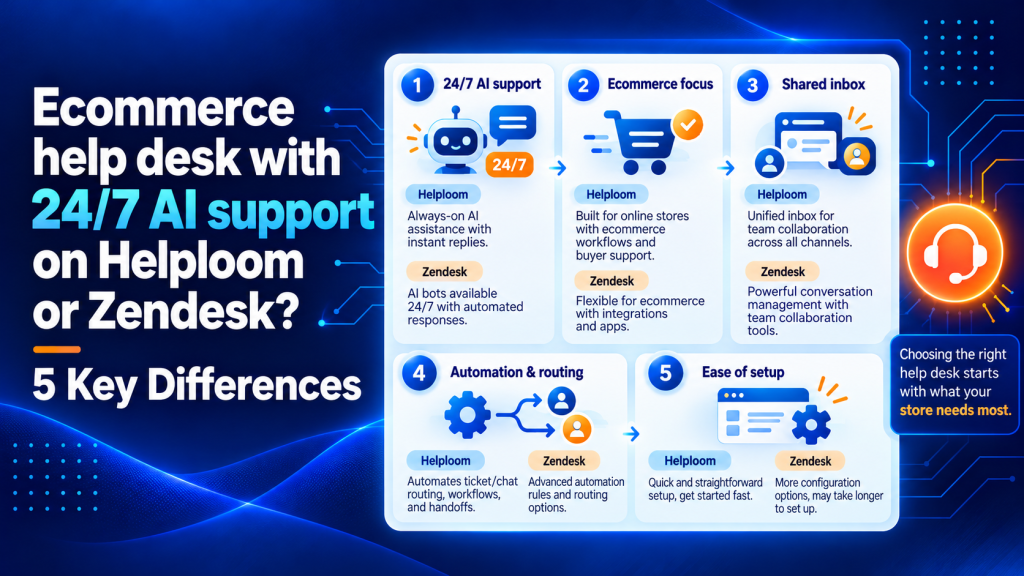
Your ecommerce help desk choice will either save your team hours every week or bury them in workarounds. That’s the real gap between platforms built for online stores and those adapted from generic support software. With 24/7 AI support now table stakes for customer expectations, the question isn’t whether to automate but which platform actually handles order-aware conversations without constant human babysitting.
Helploom and Zendesk both promise AI-powered support for ecommerce brands, but they solve different problems for different teams. Below, you’ll find five concrete differences that determine which one fits your store’s size, complexity, and growth trajectory.
Key Points
- Helploom pulls Shopify and WooCommerce order data directly into the support view so agents see order status, shipping carrier, tracking number, and return eligibility without switching tabs, turning five-minute tickets into 90-second resolutions.
- Helploom’s AI is trained on ecommerce workflows out of the box and can check shipping status, initiate returns, and confirm cancellations by reading your store’s live data, while Zendesk’s AI agents charge per automated resolution and require you to map intents, build flows, and test how escalation works yourself.
- Helploom bundles AI into its per-agent pricing with no separate meter for automated resolutions, so your November invoice stays predictable when Black Friday triples ticket counts, whereas Zendesk’s per-resolution AI billing means peak volume spikes directly increase your cost.
- Most ecommerce brands connect their store to Helploom, import help articles, and start handling tickets within a day without needing a consultant, while Zendesk’s settings stretch across dozens of menus and typically require weeks to months for full setup.
- Zendesk’s omnichannel engine is more mature for teams that need voice, SMS, social DMs, community forums, and in-app messaging all managed from one queue, while Helploom covers email, chat, and the social channels most DTC stores rely on.
- During your trial, run both platforms against your top 10 ticket types and measure how many the AI resolves without escalation, how fast agents find order context, and how your total projected cost looks at peak volume, because that data tells you more than any comparison article can.
What is ecommerce help desk?
An ecommerce help desk is support software designed to manage customer inquiries for online stores across channels like email, live chat, and social media.
It centralizes order data, automates common requests like tracking updates and returns, and helps teams resolve tickets faster by surfacing purchase history and shipping status directly in the support view.
Before diving into the details, here’s a side-by-side snapshot of how these two platforms compare across the factors that matter most to ecommerce teams.
| Criteria | Helploom | Zendesk |
|---|---|---|
| Ecommerce Focus | Built specifically for online stores | General-purpose, with ecommerce add-ons |
| AI Auto-Resolution | Order-aware AI resolves tracking, returns, cancellations natively | AI agents available at additional per-resolution cost |
| Shopify/WooCommerce Integration | Native, pulls order data into every ticket | Available through marketplace apps and third-party connectors |
| Setup Time | Hours to days | Weeks to months for full configuration |
| Pricing Model | Flat per-agent pricing with AI included | Per-agent base + AI usage fees + add-on modules |
| Best For | Shopify-first brands and mid-market DTC teams | Enterprise teams needing broad omnichannel and deep customization |

5 differences that actually matter for ecommerce teams
1. Order context inside every ticket
This is the biggest differentiator, and the one most comparison posts gloss over.
Helploom pulls Shopify and WooCommerce order data directly into the support view.
Your agent (or AI) sees the customer’s order status, shipping carrier, tracking number, and return eligibility without switching tabs.
That context turns a five-minute ticket into a 90-second resolution.
Zendesk can surface order data too, but you’ll need a marketplace app or custom integration to get there.
For large teams with dedicated ops resources, that’s manageable.
For a 5-person support team running a Shopify Plus store, it’s one more thing to configure and maintain.
If your agents spend their day on “where’s my order?” tickets, native order context determines how fast they handle each one.
2. AI that resolves vs. AI that deflects
Both platforms offer AI, but the architectures differ sharply.
Helploom’s AI is trained on ecommerce workflows out of the box.
It can check an order’s shipping status, initiate a return, and confirm a cancellation without handing off to a human.
The AI reads your store’s live data, so its answers reflect what’s actually happening with that customer’s order right now.
Zendesk’s AI agents are more general-purpose.
They’re powerful and highly configurable, but they charge per automated resolution, and connecting them to ecommerce-specific actions requires more setup.
You’ll need to map intents, build flows, and test how escalation works yourself.
Here’s the question worth asking during your trial. What percentage of your common tickets can the AI fully resolve without human help?
That auto-resolution rate determines your real ROI. Similar to how automation workflows for B2B only pay off when they trigger reliably, AI support only saves money when it actually closes tickets.
3. Total cost at real ticket volumes
Zendesk’s per-seat pricing looks straightforward until you add AI resolution fees, premium integrations, and the modules you’ll eventually need (like workforce management or advanced analytics).
A 10-agent team on Zendesk’s Suite Professional can easily reach substantial monthly costs before AI costs enter the picture.
Helploom bundles AI into its per-agent pricing.
No separate meter ticking for every automated resolution.
That distinction matters most during peak volume.
Black Friday doesn’t send a polite warning before ticket counts triple.
If your AI cost scales per resolution, your November invoice will surprise you.
If it’s flat, you’ve already budgeted for the spike.
We’d recommend modeling your cost at three ticket volumes.
Compare your quiet month, your average month, and your peak.
The platform that looks cheaper at low volumes might cost more when traffic surges.

4. Setup and ongoing admin overhead
Zendesk is a Swiss Army knife.
It handles support across industries, channels, and use cases from IT ticketing to HR requests.
That breadth means you configure across dozens of menus, triggers, and layers of automation.
For enterprise teams with a dedicated support ops person, that flexibility is a strength.
For a DTC brand that needs to route tickets and let AI handle order questions, it’s overhead.
Helploom’s narrower scope means faster setup.
Most ecommerce brands connect their store, import their help articles, and start handling tickets within a day.
You won’t need a consultant to configure it, and your agents won’t need a training manual the size of a textbook.
5. Channel coverage and omnichannel depth
Zendesk wins here, and it’s worth saying plainly.
If you need voice, SMS, social DMs, community forums, and in-app messaging all managed from one queue, Zendesk’s omnichannel engine is more mature.
It’s been building that infrastructure for over a decade.
Helploom covers email, chat, and the social channels most ecommerce brands rely on.
For the majority of DTC stores, that’s enough.
But if your support strategy involves phone callbacks or complex IVR flows, you’ll outgrow Helploom’s channel set.
Knowing which channels your customers actually use matters more than which channels a platform theoretically supports.
Audit your ticket sources before you weigh this difference too heavily.

How to evaluate ecommerce help desk features
Start with your top 20 ticket types and the channels they arrive through.
If order status, returns, and shipping questions dominate your queue, prioritize platforms with native ecommerce integrations and AI trained on those workflows.
If you handle complex multi-step cases across voice, email, and social, you’ll need deeper omnichannel routing.
Look for platforms that surface order data directly in the ticket view so agents can answer without switching tabs or asking the customer to repeat details.
Evaluate AI capabilities by measuring how many common tickets the system can fully resolve without escalation.
Check whether the AI reads live order status or relies on static knowledge base articles.
Test how automation performs with your actual ticket types during high-traffic periods.
Run a trial with real tickets from your queue.
Measure how long it takes agents to reach the right answer, how often the AI escalates, and how much effort each ticket requires.
The platform that performs well in your environment is the one that will deliver ROI once you’re past the contract signature.
Comparing top ecommerce help desk software
Helploom is built specifically for ecommerce teams running Shopify or WooCommerce stores.
It pulls order data into every ticket, trains AI on ecommerce workflows out of the box, and bundles automation into flat per-agent pricing.
Setup takes hours to days, and most teams start handling tickets without needing a consultant.
Zendesk is a general-purpose platform with ecommerce capabilities available through marketplace apps and custom integrations.
It offers deeper omnichannel support across voice, SMS, social, and community forums, with extensive ways to customize.
Setup typically takes weeks to months, and AI agents charge per automated resolution on top of base pricing.
Gorgias is another ecommerce-focused option that integrates with Shopify and pulls order data into tickets.
It offers macros and rules tailored to common ecommerce requests, with pricing that scales per ticket volume rather than per agent.
Freshdesk provides a middle ground between configurability and ease of use, with ecommerce integrations available through its marketplace.
It supports omnichannel routing and offers AI capabilities at a lower entry price than Zendesk, though setup complexity falls between Helploom and Zendesk.
Model your total cost at three volumes for each platform you evaluate.
Compare your quiet month, your average month, and your peak season.
A platform with lower per-seat pricing can end up costing more if AI usage fees spike during high-traffic periods.
How to choose the right ecommerce help desk
Start by mapping your top 20 ticket types and the channels they arrive through.
If order status, returns, and shipping questions dominate your queue, prioritize platforms with native ecommerce integrations and AI trained on those workflows.
If you handle complex multi-step cases across voice, email, and social, you’ll need deeper omnichannel routing.
Model your total cost at three volumes. Compare your quiet month, your average month, and your peak season.
A platform with lower per-seat pricing can end up costing more if AI usage fees spike during high-traffic periods.
Run a trial with real tickets from your queue.
Measure how long agents take to resolve tickets, how often the AI escalates, and how much effort your team spends per ticket.
The platform that performs well in your environment is the one that will deliver ROI once you’re past the contract signature.
Benefits of purpose-built ecommerce support
Purpose-built ecommerce help desks reduce how long agents spend per ticket because they see order data, shipping status, and return eligibility in the same view as the customer conversation.
That eliminates tab-switching and cuts how long most tickets take to resolve.
AI trained on ecommerce workflows can resolve common requests like tracking updates and return initiations without human help, which keeps your team focused on complex cases that require judgment.
Faster setup means you’re handling tickets in days rather than waiting weeks for a consultant to configure triggers and automations.
For growing brands, that speed to value often outweighs the flexibility of a general-purpose platform.
Predictable pricing during peak seasons protects your margins.
When ticket volume triples in November, a flat per-agent model keeps costs stable while per-resolution billing can double or triple your invoice.
Best practices for ecommerce support operations
Centralize order data so agents never have to ask a customer for their order number or switch to your admin panel mid-conversation.
The faster they reach context, the faster they close tickets.
Automate repetitive requests with AI that can read live order status and take action.
Tracking updates, return eligibility checks, and cancellations should resolve without escalation.
Monitor your escalation rate as your primary AI performance metric.
If the AI hands off more than 30 percent of tickets, it’s deflecting rather than resolving, and you’re paying for automation that doesn’t reduce workload.
Set response-time targets by channel and ticket type.
According to Zendesk’s customer service research, 60 percent of customers expect a response within 10 minutes on live chat, while email expectations are more forgiving.
Align your staffing and automation strategy to those benchmarks.
Review your top 20 ticket types monthly and update macros, AI training data, and help center articles to reflect what customers are actually asking.
Support operations improve when you treat ticket data as a feedback loop.
Which ecommerce help desk fits your team
The right answer depends on your team’s maturity and your store’s complexity.
Choose Helploom if you’re a Shopify-first or WooCommerce brand with a small-to-mid-sized support team.
You want AI that handles order inquiries natively, you don’t want to hire a Zendesk admin, and your primary channels are email and chat.
Cost predictability during peak seasons matters to you.
Choose Zendesk if you’re running a large-scale operation across multiple storefronts, languages, and channels.
You have (or plan to hire) support ops specialists who can configure advanced workflows.
You need voice support and deep reporting out of the gate, and the per-resolution AI billing model fits your volume.
The decision parallels the kind of build-vs-buy analysis teams face when deciding whether more control justifies more overhead.
One more thing. Don’t skip the trial.
Run both platforms against your top 10 ticket types.
Measure how many the AI resolves without escalation, how fast agents find order context, and how your total projected cost looks at peak volume.
That data tells you more than any comparison article can.
Frequently asked questions
What is ecommerce customer service?
Ecommerce customer service is the support you provide to online shoppers across channels like email and live chat, covering pre-purchase questions and post-purchase issues. In practice, it often centers on order-related requests like shipping updates, returns, exchanges, and cancellations.
How do I speak to customer support?
Start with the brand’s Help Center and look for live chat or a contact form. These routes are usually fastest for order issues. If you need a person, ask for an agent in chat and include your order number, email, and the specific outcome you want (refund, replacement, cancellation).
How do I calculate the ROI of AI support for my ecommerce help desk?
Estimate how many tickets per month the AI can fully resolve, then multiply by your blended cost per ticket (agent time, overhead, and tooling). Compare that savings to your total help desk cost at average and peak volumes so you see whether gains from automation hold when ticket counts spike.
What should I test during a Helploom or Zendesk trial to make the decision objective?
Use a fixed set of your most common ticket types and score each platform on how many it resolves without escalation, how long agents take to reach a correct answer, and how much effort each ticket requires. Also validate that order-specific actions you rely on work end-to-end in your actual environment.
When does it make sense to choose a configurable platform even if setup takes longer?
Choose a configurable platform when your support operation is complex enough that customizing workflows becomes a competitive advantage. Examples include multiple brands, languages, compliance requirements, or many channels that must share one queue. In those cases, paying the setup and admin cost standardizes workflows across teams.
Match the platform to your actual workflow
The best ecommerce help desk is the one your team will use every day without friction.
Feature lists look impressive in demos, but day-to-day usability shows up in how long tickets take, whether agents stay, and how satisfied customers are.
If your support reality is order-heavy, Shopify-based, and growing fast, the tool with native ecommerce context and predictable AI pricing will outperform the tool with the longest feature page.
If your reality is multi-brand, multi-language, and already complex, the more configurable platform earns its setup cost.
Test before you commit.
Model costs at your real volumes.
Measure tickets resolved per agent per day, because research from SuperOffice shows that how efficiently you resolve tickets predicts customer satisfaction better than response speed alone.
The platform that improves that metric in your trial is the one that will deliver ROI in production.
Choose the platform that fits how you work today
Every ecommerce help desk comparison eventually comes down to one thing.
Does the tool fit the way your team actually works today?
Feature lists impress in demos.
Day-to-day usability shows up in how long tickets take, whether agents stay, and how satisfied customers are.
If your support reality is order-heavy, Shopify-based, and growing fast, the tool with native ecommerce context and predictable AI pricing will outperform the tool with the longest feature page.
If your reality is multi-brand, multi-language, and already complex, the more configurable platform earns its setup cost.
Test before you commit.
Model costs at your real volumes.
Measure tickets resolved per agent per day.
Need to improve how your team reaches customers beyond support? Helploom helps ecommerce and B2B teams manage customer conversations, respond to inquiries faster, and build stronger relationships through live chat, AI-powered assistance, and a shared inbox. Start turning everyday customer interactions into better experiences with Helploom today.