
A ticket management system should make conversations with customers feel faster and more personal. Most of them don’t. Instead, they bury requests in cluttered queues, duplicate replies confuse everyone, and your team spends more time hunting for context than actually helping people.
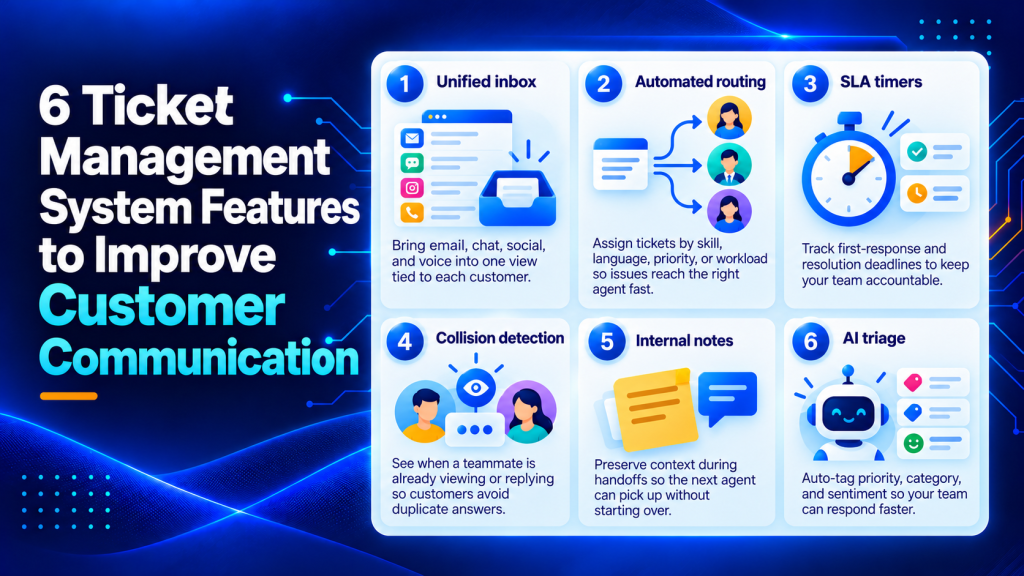
The gap between “we use a ticketing tool” and “our customers feel heard” comes down to six specific features. Miss even one, and response times balloon while satisfaction quietly erodes. Below are the capabilities that separate ticket management systems that merely log requests from those that actually improve how your team communicates.
Key Points
- Without a unified inbox that pulls email, chat, social, and voice into a single thread tied to one customer profile, agents treat each touchpoint as a separate ticket and customers waste time repeating themselves across channels.
- Automated routing assigns tickets based on skill tags, language, priority level, or current workload, eliminating the five to ten minutes of dead time that manual assignment adds before a customer even gets acknowledged.
- SLA timers that track first-response deadlines and resolution windows per ticket priority enforce accountability automatically, but tracking only first response creates bad incentives where agents send quick acknowledgments to stop the clock while real resolution takes another 48 hours.
- Collision detection shows you in real time when a teammate is already viewing or replying to the same ticket, eliminating the problem of customers receiving two different answers from two different agents on the same issue.
- AI triage reads incoming tickets and auto-assigns priority, category, and sentiment tags before you open them, but suggestions are only as good as your documentation and you will stop trusting them within a week if your knowledge base is outdated or thin.
What is a ticket management system?
A ticket management system is software that captures customer requests as tickets and helps you track, prioritize, and resolve them across channels.
It centralizes conversations so support, service, and operations teams can manage workload and communicate consistently.
The system converts every email, chat message, phone call, and social media mention into a trackable ticket with status, priority, and ownership.
At its core, a ticket management system gives you three things.
First, visibility into every open request so nothing falls through the cracks.
Second, a shared workspace where your team can collaborate on complex issues without duplicating effort.
Third, a record of every interaction so you can spot patterns, measure how you perform, and improve over time.
The best systems go further by routing tickets automatically, enforcing response deadlines, and surfacing the context your agents need to resolve issues on the first try.
Why your team needs a ticket management system
A ticket management system transforms how your team handles customer communication.
Without one, requests arrive scattered across email threads, chat windows, and voicemail. With one, every conversation lands in a single queue where you can see, prioritize, and act on it.
The first benefit is speed.
Automated routing gets tickets to the right person instantly. SLA timers keep your team accountable to response deadlines. Collision detection prevents two agents from working the same issue.
Together, these features cut how long it takes to resolve issues by hours or even days.
The second benefit is consistency.
When your team works from a unified inbox with shared notes and suggested replies, customers get accurate answers regardless of who picks up their ticket.
You stop hearing “let me transfer you” or “can you explain that again?”
The third benefit is scalability.
A shared inbox works for three people. It breaks at ten.
A ticket management system lets you grow your support team without adding chaos, because the software handles triage, assignment, and escalation automatically.
Finally, you gain insight.
Every ticket becomes a data point. You can track which issues consume the most time, which agents close tickets fastest, and where your knowledge base has gaps.
That visibility lets you improve processes instead of guessing.
Key benefits of ticket management systems
Ticket management systems deliver measurable improvements across customer experience, team efficiency, and business outcomes.
First, they reduce response times. When tickets route automatically and agents see full customer history in one view, first-response times drop by 30 to 50 percent compared to manual triage from a shared inbox.
Second, they improve customer satisfaction scores.
Customers who receive consistent answers and never repeat themselves rate interactions higher. CSAT scores typically rise 15 to 20 points within the first quarter after you adopt a proper ticketing system.
Third, they cut operational costs.
Agents handle more tickets per hour when they spend less time searching for context or coordinating handoffs. You often see a 20 to 30 percent increase in tickets resolved per agent without adding headcount.
Fourth, they prevent issues from escalating.
SLA timers and automated escalation catch tickets before they age into crises. Fewer missed deadlines mean fewer angry customers and fewer emergency fire drills.
Fifth, they surface patterns you can act on.
When every ticket carries tags for category, product, and issue type, you can identify recurring problems and fix root causes. When you analyze ticket data regularly, you ship better products and write clearer documentation.
Finally, they make onboarding new agents faster.
New hires can search past tickets, follow internal notes, and use suggested replies to ramp up in days rather than weeks. That speed matters when you’re scaling support to match company growth.
An omnichannel inbox that keeps every conversation in one place
Your customers don’t think in channels.
They email on Monday, open a live chat on Wednesday, and reply to an SMS on Friday, all about the same issue.
Without a unified inbox, your agent treats each touchpoint as a separate ticket.
The result? The customer repeats themselves. The agent misses context. And resolution drags out across days that should have been minutes.
A strong ticket management system pulls email, chat, social, and voice into a single thread tied to one customer profile.
When you open that thread, you see the full timeline with no toggling between tabs and no asking “can you explain the issue again?”
Pair it with a customer-facing portal. Users can check status without sending another message. That alone cuts “where’s my update?” tickets by a noticeable margin.

Smart routing and auto-assignment
Manual ticket assignment is a bottleneck most teams don’t notice until they’re drowning.
When every new request lands in a shared queue and someone has to eyeball it, figure out who’s available, and drag it to the right person, you’ve added five to ten minutes of dead time before the customer even gets acknowledged.
Automated routing fixes this by assigning tickets based on rules you set.
Skill tags, language, priority level, or current workload all become triggers. Some systems use round-robin distribution.
Others let you build conditional logic where if the subject line contains “billing,” the ticket routes to Finance, and if the customer’s plan is Enterprise, it routes to the senior tier.
This is one area where the difference between a basic help desk and a mature ticket management system becomes obvious.
Without routing, your team scales linearly. With it, you absorb volume spikes without scrambling.
SLA timers that enforce accountability
Service-level agreements only work if the system enforces them automatically.
Built-in SLA timers track first-response deadlines and resolution windows per ticket priority.
When a deadline approaches, the system escalates by reassigning the ticket, alerting a manager, or bumping it to the top of the queue. No one has to remember to check a spreadsheet.
Speed signals respect.
A customer who gets a thoughtful first response within an hour trusts you more than one who waits a day for the same answer. SLA enforcement makes that speed consistent instead of relying on individual hustle.
Where SLA tracking falls short
One caveat applies here.
SLAs measured only by first response can create bad incentives.
Agents fire off a quick “we’re looking into this” to stop the clock, then the real resolution takes another 48 hours.
Track resolution time alongside response time, or you’re optimizing for optics rather than outcomes.
Why collision detection matters more than you think
Few things erode customer confidence faster than getting two different answers from two different agents on the same ticket.
It signals disorganization.
Collision detection shows you in real time when a teammate is already viewing or replying to the same ticket.
Some tools display a typing indicator. Others lock the reply field temporarily.
Either way, you eliminate the “sorry, my colleague already answered this” problem.
This feature sounds minor until you’re running a team of 15+ agents across shifts. Then it’s non-negotiable.

Internal notes for seamless handoffs
Tickets change hands. Agents go on break, shifts rotate, or a specialist needs to step in.
The question isn’t whether handoffs happen. It’s whether the next person has enough context to pick up without starting over.
Internal notes solve this.
They’re visible to agents and hidden from customers. A good note says “Customer tried resetting their password twice, second attempt triggered a lockout. I’ve submitted the unlock request and it just needs confirmation before closing.”
That’s a 15-second read that saves a five-minute investigation.
Teams that build automation workflows for recurring handoff scenarios cut the average time-to-resolution even further. When the system auto-attaches relevant context to each reassignment, agents spend less time reading and more time solving.
AI-powered triage and suggested replies
This is where ticket management systems have changed the most in the past two years.
AI triage reads incoming tickets and auto-assigns priority, category, and sentiment tags before you open them.
A billing dispute gets flagged as high-priority and routed to the right team instantly. A “how do I reset my password?” question gets matched to a knowledge base article and, in some systems, auto-resolved without human involvement.
How suggested replies speed up agents without replacing them
Suggested replies pull from your knowledge base and past ticket resolutions to draft a response you can edit and send.
This cuts response time dramatically for common questions while still keeping a human in the loop for nuance.
The trade-off? AI suggestions are only as good as your documentation.
If your knowledge base is outdated or thin, the suggestions will be wrong and you will stop trusting them within a week.
Before investing in AI features, audit what you’ve already documented. Companies that regularly audit their content and communications get far more value from automation tools.
Intent detection adds another layer. The system identifies whether a message is a complaint, a feature request, or a simple question, and adjusts routing and priority accordingly.
Over time, the model improves as it processes more of your ticket data.

Top ticket management systems to consider
Zendesk remains the enterprise standard for teams managing high ticket volumes across multiple channels. It offers deep customization, robust reporting, and a mature marketplace of integrations.
Freshdesk appeals to mid-market teams that want modern features without enterprise complexity. Its AI capabilities and automation workflows rival Zendesk at a lower price point.
Help Scout focuses on email-centric support with a clean interface that feels more like Gmail than a traditional ticketing system. Teams that prioritize simplicity and fast onboarding often choose it.
Intercom combines ticketing with live chat and product tours, making it a strong choice if you want to blend support with proactive customer engagement.
Jira Service Management works best for technical teams already using Atlassian products. It bridges IT service management and customer support in one platform.
HubSpot Service Hub integrates tightly with HubSpot CRM, making it the natural choice if your sales and marketing teams already live in that ecosystem.
Zoho Desk delivers solid core ticketing features at a budget-friendly price. It suits small to mid-sized teams that need multi-channel support without paying for enterprise bells and whistles.
Kayako emphasizes live chat and real-time collaboration. Teams that handle a high volume of chat conversations alongside email often prefer its unified timeline view.
Front turns email into a collaborative workspace. It’s popular with teams that want ticketing features without abandoning the familiar email interface.
Gorgias is built specifically for e-commerce support teams. It pulls in order data, shipping status, and customer purchase history automatically, making it faster to resolve transactional issues.
What to look for when comparing ticket management systems
Start with channel coverage. List every place customers contact you today, then confirm the system natively supports those channels.
Email and chat are table stakes. Phone, SMS, social media, and in-app messaging matter depending on your mix.
Check how the system handles routing and assignment.
Can you route by skill, language, priority, or workload? Does it support round-robin, conditional logic, or both?
The more complex your team structure, the more flexibility you need here.
Evaluate SLA and escalation capabilities.
Does the system track first response and resolution separately? Can you set different SLA tiers by customer segment or ticket type?
Look for visual indicators that show you which tickets are approaching a deadline.
Test the agent experience.
Open a demo ticket and walk through the reply workflow. Is the interface cluttered or clean? Can you see customer history without leaving the ticket?
Does the system surface suggested replies or relevant knowledge base articles automatically?
Review reporting and analytics.
You need visibility into ticket volume, response times, resolution rates, and agent performance. The best systems let you build custom reports and schedule them to stakeholders.
Confirm integration support.
Your ticket management system should connect to your CRM, billing platform, knowledge base, and any other tools your team uses daily. Native integrations are faster and more reliable than third-party connectors.
Finally, consider AI and automation depth.
Basic systems offer canned responses and simple macros. Advanced platforms provide intent detection, sentiment analysis, auto-triage, and suggested replies that learn from your ticket history.
Feature comparison across leading platforms
The table below compares core features across six popular ticket management systems. Use it to narrow your shortlist based on the capabilities that matter most to your team.
| Feature | Zendesk | Freshdesk | Help Scout | Intercom | Jira Service Mgmt | HubSpot Service Hub |
|---|---|---|---|---|---|---|
| Omnichannel inbox | Yes | Yes | Email-focused | Yes | Limited | Yes |
| Automated routing | Advanced | Advanced | Basic | Advanced | Advanced | Moderate |
| SLA tracking | Yes | Yes | Yes | Yes | Yes | Yes |
| Collision detection | Yes | Yes | Yes | Yes | Limited | Yes |
| AI triage | Yes | Yes | Limited | Yes | Limited | Yes |
| Custom reporting | Extensive | Extensive | Moderate | Moderate | Extensive | Moderate |
| Native CRM integration | Via marketplace | Via marketplace | Via marketplace | Built-in | Atlassian only | HubSpot CRM |
| Starting price (per agent/month) | Varies by plan | Varies by plan | Varies by plan | Varies by plan | Varies by plan | Varies by plan |
Pricing reflects standard plans and excludes enterprise tiers. Features listed as “Limited” are available through workarounds or third-party add-ons rather than native functionality.
How to pick the right ticket management system for your team
Not every team needs all six features at full depth.
A five-person support team handling 50 tickets a day doesn’t need enterprise-grade AI triage. A 200-agent operation absolutely does.
Start by mapping your actual pain points.
Are customers complaining about slow responses? SLA timers and routing matter most.
Are you seeing duplicate replies? Collision detection is your first priority.
Teams that use proactive communication channels like newsletters to reduce inbound volume may find they need less triage automation and more emphasis on handoff quality.
Match the system to your channel mix, too.
If most of your volume comes through email, don’t overpay for a platform whose main selling point is social media integration.
And if you’re migrating from a shared inbox, look for tools with guided setup and import workflows because a rough migration can set your team back weeks.
Shortlist tools that integrate with your existing stack, match your channel mix, and are easy for agents to adopt quickly.
Frequently asked questions
What is a ticket management system?
A ticket management system is software that captures customer requests as tickets and helps you track, prioritize, and resolve them across channels. It centralizes conversations so support, service, and operations teams can manage workload and communicate consistently.
What is the best ticket management system?
The best ticket management system fits your volume, channels, and workflow complexity. Shortlist tools that integrate with your existing stack, match your channel mix, and are easy for agents to adopt quickly.
Is a ticketing system a CRM?
A ticketing system and a CRM solve different problems. CRMs manage sales relationships and pipeline, while ticketing systems manage support requests and service workflows, although some platforms integrate or overlap in customer data.
What are the must-have integrations for a ticket management system?
Prioritize integrations that reduce copy-paste work and improve context. Your email provider, chat widget, telephony, and knowledge base are essential. For many teams, billing and subscription tools, identity and access management, and incident or bug tracking integrations are also high-impact.
How can you measure whether a new ticket management system is actually improving customer communication?
Track customer-facing outcomes like CSAT, re-open rate, and the number of follow-ups needed to resolve an issue, alongside operational metrics like handle time and backlog aging. Compare a baseline period to a post-rollout period, then validate improvements by sampling real conversation transcripts for clarity and consistency.
What should you include in a migration plan when switching from a shared inbox to a ticketing platform?
Define what data must move (open conversations, key historical threads, contacts, and attachments) and what can be archived, then map labels and folders to ticket fields. Run a short pilot with a small group, document the new workflow, and schedule go-live during a low-volume window with clear rollback steps.
Choose the system that matches how your team actually works
The six features above separate support teams that react to chaos from those that communicate with consistency and speed.
Omnichannel inboxes keep context intact. Routing and SLAs enforce accountability.
Collision detection and internal notes prevent embarrassing mistakes. AI triage frees you to focus on problems that actually need human judgment.
Audit your current ticket management system against this list.
Identify the one or two gaps causing the most friction, and prioritize those in your next tool evaluation.
Your customers won’t notice the software you chose, but they’ll absolutely notice when responses get faster, answers get more accurate, and they stop repeating themselves.
If your customer support workflows need the same upgrade, Helploom helps teams deliver faster, more personalized assistance with 24/7 AI-powered responses, knowledge-base-driven answers, and seamless handoffs to human agents. Its shared inbox keeps conversations organized, making it easier to manage customer inquiries without juggling multiple tools. Start streamlining your customer support with Helploom today.