
A customer sends a message at 2 a.m. about a billing error. Another opens a chat mid-checkout, unsure about a return policy. A third calls in furious, ready to cancel. Conversational AI can handle the first two in seconds. The third? That one needs a human who can listen, empathize, and save the account.
The real decision is knowing which situations call for AI or human agents and what happens when you get that split wrong. Below, five comparison points will help you figure out exactly where each option earns its place in your support operation.
Key Points
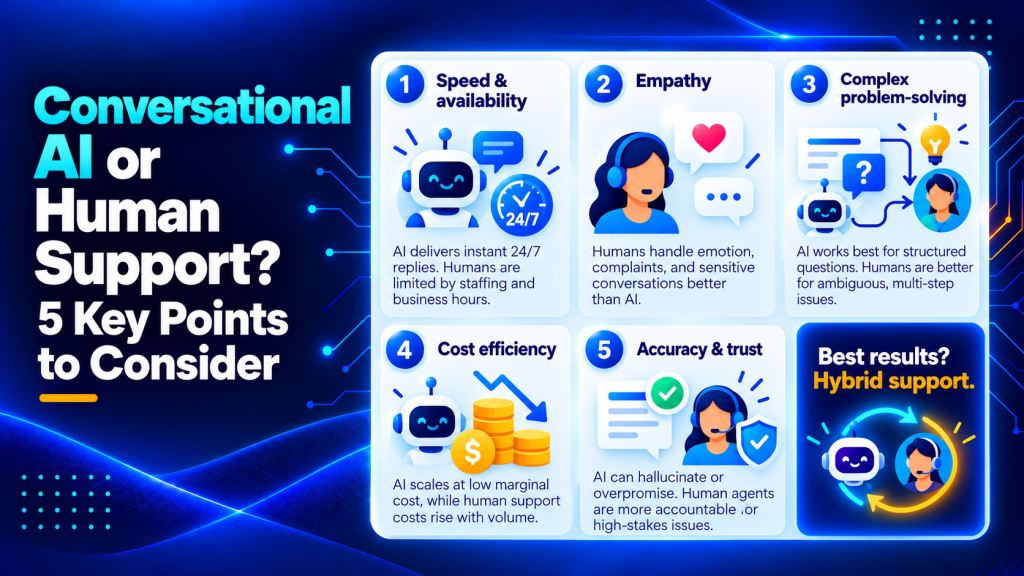
- Conversational AI delivers instant replies around the clock and handles high-volume repetitive queries like order tracking and password resets in seconds, but speed without accuracy creates worse problems than slow correct answers.
- Human agents excel at empathy and emotional intelligence in ways AI cannot replicate, making them essential for complaints, escalations, and high-value accounts where feeling heard often determines whether a customer cancels or stays.
- AI struggles with multi-step problems that require connecting dots across systems and making judgment calls, often looping or asking the same clarifying question twice, while humans naturally handle ambiguous cases that have several moving parts.
- Conversational AI can hallucinate and confidently state policies that don’t exist or promise timelines never approved, a structural limit of large language models that requires you to be transparent with customers, set clear escalation triggers for billing disputes and regulated topics, and audit regularly beyond the pilot phase.
- The best support teams design hybrid handoff paths where AI handles intake and straightforward requests, then routes conversations to human agents with full context when confidence drops below a threshold or the customer signals frustration, often achieving faster first-response times and higher satisfaction simultaneously.
What is conversational AI?
Conversational AI is software that understands and responds to users through natural language in channels like live chat, messaging apps, or voice.
In customer support, you’ll typically use it to answer common questions, guide users through simple workflows, and route complex cases to the right team. The technology combines natural language processing, machine learning, and large language models to interpret what customers want and generate responses that feel human.
The key difference from older chatbots is how flexible it is. Rule-based bots follow decision trees. Conversational AI adapts to phrasing it hasn’t seen before, handles follow-up questions, and maintains context across a conversation.
Conversational AI vs. human support: side by side
Before digging into each factor, here’s how the two options stack up across the dimensions that matter most to support teams.
| Factor | Conversational AI | Human Support |
|---|---|---|
| Speed | Instant replies, 24/7 availability | Limited by staffing and business hours |
| Empathy | Scripted tone; struggles with nuance | Reads emotions and adapts in real time |
| Complex Problem-Solving | Handles structured queries well | Excels at ambiguous or multi-step issues |
| Cost at Scale | Low marginal cost per interaction | Costs rise linearly with volume |
| Accuracy and Trust | Consistent but risks hallucination | Variable but accountable |
That table tells the broad story. The details below tell you what to actually do with it.

Five key points for choosing between AI and human support
1. Speed and availability
Conversational AI for customer service wins this one outright.
Bots don’t sleep, don’t take lunch, and don’t put callers on hold.
For high-volume, repetitive queries like order tracking, password resets, and FAQ lookups, AI resolves tickets in seconds. Human agents simply can’t match that throughput, especially during off-hours or seasonal spikes.
That said, speed without accuracy creates a different problem.
A fast wrong answer is worse than a slow right one. So while AI handles the clock, you still need guardrails to make sure the answers hold up.
2. Empathy and emotional intelligence
Here’s where humans pull ahead by a wide margin.
An angry customer wants to feel heard.
AI can detect sentiment keywords and adjust tone slightly. But it can’t pause, lower its voice, or acknowledge that a billing mistake ruined someone’s week. Human agents do that naturally, and it’s often the difference between a customer who cancels and one who stays.
We’d recommend keeping humans front and center for any interaction involving complaints, escalations, or high-value accounts.
The cost of losing those customers dwarfs the cost of a live agent.
3. Handling complex, multi-step problems
AI excels at structured problems. “Where’s my order?” has one answer.
“I was charged twice, but one charge was a pre-authorization that should have dropped off, and my bank says it didn’t” has several moving parts.
Today’s conversational AI handles the first category well. For the second, it often loops, asks the same clarifying question twice, or routes the customer to a dead end.
Human agents connect dots across systems and make judgment calls that AI still can’t replicate reliably.
The sweet spot? Use AI to gather context before you hand off. When the human agent picks up, they already have the order number, account details, and a summary of what the customer tried. That approach mirrors how newsletter automation workflows for B2B route subscribers through sequences before a sales rep steps in.

4. Cost efficiency at scale
This is the number most executives fixate on, and the math favors AI at first glance.
A single AI deployment handles thousands of simultaneous conversations. Adding the thousandth conversation costs nearly nothing. Adding a thousandth human agent costs a salary, benefits, training, and a desk.
But don’t ignore the hidden costs of bad automation.
When AI mishandles tickets, customers call back. They escalate. They churn. Your cost-per-contact metric looks great right up until your retention numbers don’t.
Track how well your AI contains tickets and what your CSAT scores look like alongside cost savings; all three need to move in the right direction.
5. Accuracy, trust, and risk
This is the point most comparison articles gloss over, and it deserves the most attention.
Conversational AI can hallucinate. It can confidently state a return policy that doesn’t exist or promise a refund timeline your finance team never approved.
It’s a structural limit of how large language models generate text.
Human agents make mistakes too, but you can hold them accountable in a way AI isn’t. You can coach a rep who gives wrong information. Coaching a model requires retraining data, prompt engineering, and monitoring infrastructure.
If you’re deploying AI for customer service, build in transparency. Let customers know they’re talking to a bot.
Create clear escalation triggers for topics where accuracy really matters. Billing disputes, medical information, and legal questions all belong in that category.
Audit AI responses regularly. The same audit discipline applied to B2B newsletter performance works here: set a review cadence, define what “good” looks like, and measure against it consistently.
Common use cases and examples
Understanding where each approach works best becomes clearer when you see real scenarios.
Where conversational AI excels
Order status inquiries are the textbook AI use case. A customer asks “Where’s my order?” and the bot pulls tracking data from your system in seconds. No hold time, no need to verify account details with a human.
Password resets and account unlocks follow the same pattern. The request is simple, the steps are identical every time, and speed matters more than empathy.
Product recommendations based on browsing history or past purchases work well when your catalog is structured and your AI can query inventory in real time. The bot asks a few qualifying questions, then surfaces three relevant options.
FAQ deflection handles the long tail of repetitive questions about shipping policies, return windows, and feature availability. When your knowledge base is solid, AI can serve accurate answers faster than a human can type them.
Where human agents are essential
Billing disputes require judgment. A customer claims they were charged twice, but your system shows one charge and one authorization hold. A human agent can review the timeline, explain what happened, and decide whether a courtesy credit makes sense.
Account cancellations often hinge on whether the customer feels heard. An AI can process the cancellation, but a human agent can uncover the root issue, offer a solution, and potentially save the account.
Product troubleshooting for complex issues benefits from a human who can ask follow-up questions, interpret vague descriptions, and connect symptoms across multiple systems. “It’s not working” means a hundred different things, and humans navigate that ambiguity better.
High-value customer outreach, whether onboarding a new enterprise client or checking in after a major purchase, demands the personal touch that builds long-term relationships.
How to implement a hybrid support strategy
Most teams know they need both AI and human agents. The hard part is designing the handoff so customers don’t feel the seams.
Map your ticket types first
Pull your top 20 ticket categories from the last quarter. Tag each one as structured (clear question, clear answer) or unstructured (requires judgment or multiple steps).
Structured tickets are your AI candidates. Unstructured tickets stay with humans.
For each AI candidate, define the happy path and the edge cases. What happens when the order number doesn’t exist? When the customer’s question is adjacent to the FAQ but doesn’t quite match? Write those escalation rules before you deploy.
Set confidence thresholds for escalation
Your AI should know when it’s out of its depth. Most platforms let you set a confidence score below which the bot routes to a human.
Start conservative. If the bot is less than 80 percent confident it has the right answer, escalate immediately. You can lower that threshold once you’ve reviewed enough transcripts to trust how the model judges itself.
Also escalate on sentiment. If the customer uses words like “frustrated,” “unacceptable,” or “cancel,” route to a human regardless of confidence score.
Pass full context at handoff
The worst hybrid experience is when the customer has to repeat everything they told the bot. Your handoff should include the original question, any account identifiers the bot collected, and a summary of steps already attempted.
If the bot tried three troubleshooting steps and none worked, the human agent needs to see that log. Otherwise they’ll suggest the same steps and the customer will lose trust in your entire operation.
Monitor escalation rate and resolution quality
Track what percentage of AI conversations escalate to humans. If it’s above 30 percent, your bot is probably taking on too much or your confidence thresholds are too aggressive.
If it’s below 5 percent, you might be under-escalating and leaving customers stuck in loops.
Also audit a sample of AI resolutions each week. Did the bot answer the actual question? Did it stay on-brand? Did it avoid hallucinating policies?
Test and refine your handoff triggers
Set up A/B tests to compare different escalation rules. Does routing to a human after two failed attempts work better than routing after three? Does flagging frustrated language earlier improve your CSAT scores?
Review your escalation logs monthly. Look for patterns in what triggers handoffs and whether those triggers are catching the right cases. According to Zendesk research on customer service AI, teams that regularly refine their escalation logic see 23 percent higher customer satisfaction than those that set rules once and leave them static.
Also watch for false positives where the AI escalates unnecessarily. If your bot is handing off simple questions it should handle, you’re wasting agent time and slowing down response times for customers who genuinely need human help.
Train your human agents on AI handoffs
Your agents need to know what the AI already tried before they pick up a conversation. Build a standard handoff summary that appears at the top of every escalated ticket, and train your team to read it before responding.
Also teach your agents when to loop the AI back in. If a customer asks a follow-up question that’s straightforward after the human resolved the complex part, the agent can route them back to the bot rather than staying on the line for a simple FAQ answer.
Research from Harvard Business Review on AI in customer service shows that teams with clear AI-to-human and human-to-AI handoff protocols resolve 31 percent more tickets per agent without sacrificing quality scores.
The hybrid model that actually works
The best support teams don’t pick one or the other. They design handoff paths.
Think of it as triage. AI handles the intake, identifies the issue type, collects relevant details, and resolves straightforward requests. When confidence drops below a threshold, or the customer signals frustration, the conversation routes to a human agent with full context attached.

Teams running hybrid models often see faster first-response times and higher CSAT simultaneously, because each channel handles what it’s best at.
The key metric to watch is how often you escalate. Too high means your AI needs better training data. Too low might mean it’s resolving things it shouldn’t be.
Designing those workflows shares DNA with how teams decide between outsourcing and building in-house. The question isn’t “which is better?” It’s “which handles which part?”

Build the right split
The conversational AI vs. human support debate has no universal answer.
Your product complexity, customer expectations, and support volume all shift the balance.
Start by mapping your top 10 ticket types. Identify which ones are repetitive and structured (AI candidates) and which require judgment or emotional sensitivity (human territory).
Then build your escalation logic around that map. The companies that get this right automate the right things.
Frequently asked questions
Which conversational AI is best?
The best conversational AI depends on your use case, support volume, channels (chat, email, voice), and risk tolerance for accuracy. Compare options by their ability to integrate with your help desk and knowledge base, provide strong handoff to humans, and offer solid monitoring and compliance controls.
What is a conversational AI?
Conversational AI is software that can understand and respond to users through natural language in channels like live chat, messaging apps, or voice. In customer support, you typically use it to answer common questions, guide users through simple workflows, and route complex cases to the right team.
Is there an AI that I can just talk to?
Yes, many conversational AI tools support real-time chat, and some also support voice conversations through call center and voice assistant integrations. For support teams, the more important question is whether it can reliably pull approved answers from your systems and escalate to a human when the customer needs judgment or empathy.
Which AI is best for just chatting?
For casual conversation, the best option is usually a general-purpose chat assistant that is optimized for open-ended dialogue. For customer support, prioritize an AI that can stay grounded in your policies and knowledge base, and that can transfer the conversation to a human without losing context.
How do you decide what your AI should never handle without a human review?
Start by listing scenarios where a wrong answer creates outsized harm. Billing disputes, refunds, account cancellations, and regulated topics like medical and legal information all belong in that category. Then require human approval or immediate escalation for those intents, and regularly review real transcripts to catch new edge cases.
What should be in a good AI to human handoff so customers do not have to repeat themselves?
A strong handoff includes what the customer wants, key identifiers (order ID, account email), a concise conversation summary, and the steps already attempted. It also helps to pass sentiment or urgency signals, plus any screenshots, error messages, or relevant timestamps the bot collected.
How do you measure whether conversational AI is improving support quality?
Use a balanced scorecard. Include customer outcomes like CSAT, repeat-contact rate, and churn or retention trends, alongside operational metrics like cost per contact. Also track how well your AI resolves issues with periodic audits, looking for policy accuracy, whether you escalate appropriately, and what drives complaints.
Design your support mix around customer outcomes
The conversational AI vs. human support question resolves when you stop asking which is better and start asking which serves your customer best in each scenario.
Map your ticket types. Set clear escalation rules. Pass full context at handoff. Measure both efficiency and satisfaction.
The teams that win this space treat AI as a tool that amplifies human judgment rather than a replacement for it. Your customers will notice the difference, and your retention numbers will reflect it.
Where to start with your support strategy
Whether you’re exploring conversational AI or improving your human support team, the goal is the same: deliver faster, more personalized assistance without sacrificing the human touch. Start by understanding your customers’ needs, identifying repetitive tasks, and determining where automation can make the biggest difference.
Ready to put your support strategy into action? Helploom combines 24/7 AI-powered chat, knowledge-base-driven answers, and seamless handoffs to human agents. A shared inbox keeps conversations organized, helping your team respond faster while focusing on issues that need a personal touch. Start building smarter, more scalable customer support with Helploom today.