
Customer support software shouldn’t require a six-month rollout and a dedicated IT team just to answer a customer’s question. Yet that’s exactly the trap many growing companies fall into: they pick a platform based on a polished demo, only to discover the tool doesn’t match how their team actually works.
Recent research found that more than half of customer-service journeys now begin on third-party platforms. That stat alone should reshape how you evaluate any tool in this category.
Below, you’ll find a framework for choosing the right customer support software for your team size, support volume, and channel mix, along with the features and pitfalls that separate a good investment from an expensive regret.
Key Points
- More than half of customer-service journeys now begin on third-party platforms, which should reshape how you evaluate any support tool.
- Many recent as-a-service expansion purchases resulted in moderate or high regret, making it critical to validate tools against your actual workflows rather than feature lists.
- Even a basic auto-tagging rule can save 30 minutes a day per agent across a mid-sized team, yet companies routinely underestimate how much time they spend triaging tickets manually.
- AI-suggested replies and ticket summarization are working right now and shave seconds off every interaction that compound across hundreds of daily tickets, while fully autonomous AI agents only work well for narrow, predictable queries like password resets and order status checks.
- A tool priced at one rate per agent per month with expensive add-ons for AI features, additional channels, premium support, and storage overages can easily cost more than a higher-priced tool that includes everything.
What is customer support software, and who actually needs it?
Customer support software is any platform that helps a team receive, organize, track, and resolve customer requests across one or more channels.
At the simplest level, it replaces a shared inbox. At the most complex, it orchestrates AI agents, phone systems, live chat, and self-service portals under a single dashboard.
You need dedicated software the moment your team starts dropping tickets, duplicating replies, or losing context between channels.
For a five-person startup running support out of Gmail, that moment arrives faster than most founders expect.

Customer support vs. help desk vs. itsm: which category do you need?
These labels overlap enough to confuse any buyer, so here’s the short version.
Help desk software focuses on internal or external ticket management. It’s the core engine. Customer support software wraps that engine in customer-facing channels like live chat, social media, and a knowledge base. ITSM (IT service management) tools add change management, asset tracking, and SLA workflows tailored to IT operations.
If your primary job is answering customer questions, you want the middle category.
If your IT department fields internal requests, ITSM is the better fit. Many teams mistakenly buy an ITSM tool because it looked impressive during evaluation, then spend months disabling features their support agents will never touch.
Features every customer support tool should include
Feature lists on vendor websites run long.
Most of those features sound useful in isolation but sit unused after launch. Focus your evaluation on the capabilities that directly affect how fast you resolve tickets and how productive your agents are.
Ticketing and omnichannel routing
A ticket system is table stakes. What separates good from adequate is how the tool routes conversations. Can it assign tickets based on agent skill, current workload, or customer tier? Does it merge duplicate requests from the same person across email and chat?
Omnichannel routing is important when customers reach out on more than two channels.
Self-service knowledge base
A well-maintained knowledge base deflects tickets before they’re ever created.
Look for a tool that lets you publish help articles, embed them in your product, and track which articles actually reduce contact volume. Many tools offer a knowledge base; fewer make it easy to measure whether it’s working.
Automation and workflow rules
Automation should handle the repetitive work your agents hate. Tagging tickets by topic, sending first-response acknowledgments, escalating SLA breaches.
Good workflow engines let non-technical managers build these rules without writing code.
We see teams routinely underestimate how much time they spend triaging tickets manually. Even a basic auto-tagging rule can save 30 minutes a day per agent across a mid-sized team.
Reporting that drives decisions
Harvard Business Review research emphasizes that leaders should evaluate support tools against meaningful customer and operational outcomes. Before you compare analytics features, define the three to five metrics your team will actually act on.
First response time, resolution time, and customer satisfaction score cover most teams.
If you can’t explain what you’d change based on a metric, you don’t need it on a dashboard.
How to choose the right customer support software for your team
Now that you know what features matter, the question becomes which combination of features fits your situation.
Picking the wrong tool is common enough that many recent as-a-service expansion purchases resulted in moderate or high regret. Here’s how to avoid joining that group.

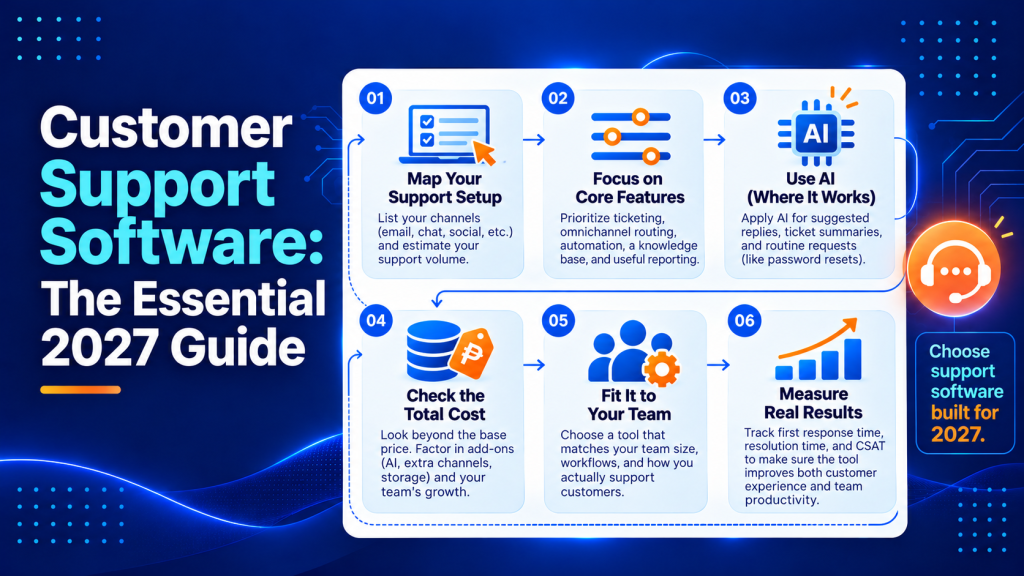
Step 1: map your support channels and volume
Write down every channel where customers currently contact you. Email, chat, phone, social DMs, app store reviews, community forums. Then note the approximate weekly volume for each.
This exercise alone eliminates tools that don’t support your channels or that charge per-channel add-on fees you didn’t budget for.
Step 2: define your must-have workflows
Don’t start with a feature checklist. Start with the three to five workflows your team runs most often.
A SaaS company might prioritize bug-report escalation to engineering. An ecommerce brand might care most about order-status lookups and refund approvals.
Write these workflows out in plain language. You’ll use them to test vendor demos, which brings us to a step most buyers skip.
Step 3: run your own demo script
Vendors demo their strongest features. You should demo your hardest workflows.
Ask shortlisted vendors to walk through your actual scenarios using realistic data. If a vendor resists or pivots to a canned presentation, that tells you something about how your post-sale experience will go.
Step 4: evaluate how deeply tools integrate
A support tool that doesn’t connect to your CRM, your billing system, or your product database forces agents to tab-switch constantly.
Check whether integrations are native or require a third-party connector. Native integrations tend to be more reliable and easier to maintain.
For teams already running outreach and sales campaigns, aligning your support tool with your email infrastructure matters. The same principles that apply to newsletter automation workflows for B2B apply here. Data should flow between systems without manual imports.
Step 5: calculate total cost
Per-agent pricing is straightforward. What catches buyers off guard are add-on costs for AI features, additional channels, premium support from the vendor, and storage overages.
Ask for a total cost estimate based on your actual team size and expected growth over 12 months.
A tool priced lower per agent per month with expensive add-ons can easily cost more than a higher-priced tool that includes everything.
Customer support software by use case
Not every team needs the same tool.
A five-person ecommerce team and a 200-seat enterprise support center have fundamentally different requirements. Here’s where the category splits.
Small business and startups
You need fast setup, affordable per-agent pricing, and a shared inbox that’s easier to manage than Gmail labels. Look for tools with a free tier or low-cost starter plan that includes at least email and chat.
Don’t overbuy. You can migrate to a heavier tool later, but you can’t get back the time lost configuring features you won’t use for two years.
SaaS companies
SaaS support teams need tight product integration. That means an in-app messenger, the ability to log bugs directly from tickets, and a knowledge base that lives inside your product.
Prioritize tools with strong API access and native integrations with your engineering stack.
Measuring how support interactions affect retention matters here, and the same ROI attribution thinking that applies to B2B newsletters applies to support. Track whether resolved tickets correlate with renewed subscriptions.
Ecommerce brands
Order lookups, return processing, and shipping updates dominate ecommerce support queues.
The right tool integrates directly with Shopify, WooCommerce, or your commerce platform so agents see order details without leaving the ticket. Automation shines here. A well-built macro can resolve “where’s my order?” tickets in seconds.
Enterprise and multi-team operations
Enterprise buyers need role-based permissions, SSO, audit logs, and the ability to run multiple brands or departments from a single instance.
Expect longer implementation timelines and higher per-seat costs. The trade-off is deeper customization and compliance features that smaller tools simply don’t offer.
AI in customer support: what actually works
Every vendor now claims “AI-powered” support. Most of these claims boil down to three actual capabilities, and only one of them consistently delivers measurable results today.

AI-suggested replies and summarization
This is the capability that’s working right now.
AI reads an incoming ticket, suggests a draft response based on your knowledge base, and summarizes long conversation threads so agents can pick up tickets faster. It shaves seconds off every interaction, and those seconds compound across hundreds of daily tickets.
Autonomous AI agents: promise vs. reality
Fully autonomous AI agents that resolve tickets without human involvement sound transformative. In practice, they work well for a narrow set of predictable queries like password resets, order status checks, and account balance lookups.
Anything requiring judgment, empathy, or access to detailed product context still needs a human in the loop.
Forrester’s analysis of agentic platforms recommends choosing AI-enabled support software for its integration quality and operational control. We’d echo that. A chatbot that confidently gives wrong answers does more brand damage than a slow human reply.
Where to invest your AI budget
Start with AI-assisted triage and draft responses. These are low-risk, high-return features.
Move to autonomous resolution only after you’ve built a strong knowledge base and measured deflection rates. Skipping the knowledge base step is how companies end up with AI bots that hallucinate answers.
If your team also runs outbound email campaigns, AI writing tools can complement your support setup. Platforms like Mailshake use AI to draft outreach emails, and the same principle applies to support. AI handles the first draft, a human ensures accuracy.
Common mistakes that derail your implementation
Even the right tool fails when the rollout goes sideways. These are the three mistakes we see most often.
Buying for features instead of workflows. A tool with 200 features isn’t better than one with 40 if those 40 cover your actual use cases. Unused features add complexity to training and administration without delivering value.
Skipping agent input during evaluation. Managers choose tools; agents use them. If you don’t involve frontline agents in the demo process, you’ll discover usability problems after the contract is signed.
Include at least two agents in every vendor evaluation.
Ignoring how hard migration will be. Moving ticket history, macros, and automation rules from an old platform takes more time than most teams budget. Ask vendors about migration support before you commit.
Some offer white-glove migration; others hand you an API and wish you luck. Companies that invest in strong communication systems for revenue teams understand this. The data transfer is often harder than the tool setup.
Frequently asked questions
What are some customer service systems?
Common customer service systems include ticketing and help desk platforms, live chat and in-app messaging tools, self-service knowledge bases, and call center software. Many companies combine these into an omnichannel customer support platform so conversations stay connected across channels.
How can I chat with customer support?
Most companies offer chat through an in-app messenger on their website or inside the product, or via social messaging channels. If you are setting this up for your own team, choose support software that includes live chat plus routing so chats reach the right agent quickly.
What is the best software for customer support?
The best option depends on your channel mix, ticket volume, and the workflows you run most often. Shortlist a few tools, then validate them by running your real scenarios, checking how reliably integrations work, and confirming the true 12-month cost based on growth.
Is there a free alternative to Zendesk?
Yes, some support tools offer a free tier or free trial, typically with limits on seats, channels, or advanced automation. Before choosing a free plan, confirm it supports your required channels and that you can export data cleanly if you need to upgrade or migrate later.
What security and compliance features should enterprise teams require from customer support software?
Enterprise teams typically need SSO, role-based permissions, audit logs, and controls for multi-brand or multi-department access. If you operate in regulated environments, also verify data retention, access logging detail, and how integrations handle sensitive customer data.
How do you prevent AI suggested replies from introducing incorrect or risky responses?
Treat AI drafts as assistive content and require human review for anything beyond simple, low-risk requests. Use clear approved sources (like your help content and policy docs), add lightweight QA spot checks, and track error themes so you can tighten guidance and training over time.
What should a support team include in an RFP or vendor scorecard to avoid a bad purchase decision?
Include weighted criteria for workflow fit, how reliably integrations work, admin effort, and total cost of ownership, plus a section for implementation and migration commitments. Require vendors to demonstrate your highest-friction scenarios with realistic data, then score them on time-to-resolution and agent usability.
Your next move: match the tool to the workflow
The best customer support software isn’t necessarily the one with the most features. It’s the one that helps your team resolve customer issues faster without adding unnecessary complexity or costs.
Helploom brings ticket management, live chat, and AI-powered customer support into one platform. Its AI agents can handle repetitive inquiries, while your support team focuses on more complicated issues that require human attention. That means fewer routine tickets to manage, less time spent switching between tools, and more room to grow without continually expanding your support team.
Looking for customer support software that works with your team, not against it? Explore Helploom and see how you can combine AI automation with human support to deliver better customer experiences at a lower operational cost.