
AI customer support software has a dirty secret: most buyers regret their first pick within six months. The tool demos beautifully, the sales team promises deflection, and then reality hits. Tickets pile up in a limbo between bot and agent, customers rage-quit the chat widget, and your support lead spends more time babysitting the AI than answering questions directly.
Forecasts suggest that agentic AI will autonomously resolve a large majority of common customer service issues in the coming years. We’re not there yet. But the gap between the best and worst tools on the market has never been wider. Below, you’ll find the AI customer support platforms worth evaluating right now, the criteria that actually matter when choosing one, and the implementation mistakes that tank even the best software.
Key Points
- Most buyers regret their first AI customer support tool within six months because they confuse AI chatbots (which handle scripted FAQ deflection), AI agents (which reason across systems and take actions like issuing refunds), and AI helpdesks (which assist human reps with suggested replies and auto-categorization), then buy the wrong category for their team size and complexity.
- Every AI customer support platform runs on your documentation, so if your help center is outdated or incomplete the AI will reflect that, which means budgeting two to four weeks for a knowledge base audit before go-live improves resolution rates more than any feature upgrade.
- The moment an AI conversation transfers to a human agent is when your customer is most frustrated, so if the agent asks them to repeat their issue you have actively made the experience worse than having no AI at all, which is why you must pass full conversation history and train agents on smooth handoffs.
- A realistic first-year deflection target for most teams falls between 30 and 50 percent, with anything below that range in the first 90 days suggesting a knowledge gap or poor fit, so vendors who promise high deflection on day one are selling a fantasy.
- The difference between a successful AI support deployment and a failed one almost never comes down to which vendor you chose, but whether you audited your ticket data, cleaned your knowledge base, designed a real escalation path, and measured what happened after go-live.
What is AI customer support?
Before you compare vendors, get clear on the category. These three labels get used interchangeably in marketing copy, but they describe very different products.
An AI chatbot handles scripted or semi-scripted conversations.
It matches user input to predefined intents, pulls from a knowledge base, and escalates anything outside its training. Think FAQ deflection and order-status lookups. Cheap, fast to deploy, limited in scope.
An AI agent goes further.
It reasons across multiple systems, takes actions (issuing refunds, modifying subscriptions, resetting passwords), and learns from outcomes. These are the “agentic AI” platforms analysts reference. They cost more and take longer to set up because they need system integrations and guardrails.
An AI helpdesk wraps AI capabilities around a full ticketing and workflow engine.
Agents get AI-suggested replies, auto-categorized tickets, and sentiment analysis. The AI assists humans rather than replacing them. Best fit for teams that want to augment experienced reps.
Buying the wrong category is the single most expensive mistake in this space.
A five-person support team doesn’t need an agentic platform built for 500-seat contact centers. And an enterprise with complex escalation workflows won’t get far with a chatbot that can only surface help articles.

8 best AI customer support tools
Recent evaluations examined more than a dozen conversational AI providers for customer service. We’ve narrowed the field further based on real deployment patterns, pricing transparency, and how each tool handles the hard stuff: escalations, hallucination risk, and multilingual support.
Zendesk AI: the safe enterprise bet
Zendesk baked AI directly into its existing helpdesk, which means you don’t rip out your ticketing system to add automation.
The AI agent resolves common requests (password resets, order tracking, return status) and hands off to human reps with full conversation context when it can’t.
Where it shines is agent assist. Reps get AI-generated reply suggestions, tone adjustments, and automatic ticket summaries. If your team already runs on Zendesk, the switching cost is basically zero.
The catch is pricing.
It scales per automated resolution, which gets expensive fast for high-volume teams. Model it carefully before you commit.
Intercom fin
Fin is the AI customer support tool that gets the most buzz right now, and it mostly earns it.
It ingests your help center, past conversations, and custom data sources, then resolves tickets without scripted flows. You don’t build decision trees. You point it at your knowledge and let it reason.
Setup is really fast. Most teams go live within a week. The resolution quality depends almost entirely on how good your documentation is, though. Garbage knowledge base in, garbage answers out.
Pair it with a dedicated content ops person who audits and updates your help docs monthly.
Fin is only as accurate as what you feed it.
Freshdesk Freddy AI for growing teams
Freshdesk’s AI layer (Freddy) targets mid-market teams who need AI assistance without enterprise complexity.
The auto-triage feature routes tickets by topic and urgency, and the suggested-response engine cuts handling time for repetitive questions.
It’s the strongest option if you want helpdesk-first AI. The bot capability exists but feels secondary to the agent-assist tooling. That’s fine if your strategy is augmentation over automation.
Ada
Ada is a pure-play AI agent platform.
No ticketing system, no shared inbox. It sits in front of your existing stack and resolves customer requests across chat, email, and social channels before they become tickets.
The standout feature is its reasoning engine, which connects to your backend systems (Shopify, Stripe, your CRM) and takes real actions. A customer asking “Where’s my order?” doesn’t get a help article. They get their actual tracking number.
It’s not cheap.
And the setup requires integration work that smaller teams may not have bandwidth for. But for high-volume e-commerce and SaaS support, Ada consistently delivers the highest deflection rates we’ve seen.
Tidio: best budget option
If you’re running a small team and need AI customer support without a five-figure annual contract, Tidio is the place to start.
The AI chatbot handles common questions, the visual flow builder is intuitive, and pricing starts low enough that you won’t need budget approval.
Don’t expect enterprise-grade reasoning. This is a chatbot for teams handling modest conversation volume. But for SMBs, it covers the basics well.
Why Kustomer works for omnichannel teams
Kustomer unifies customer timelines across email, chat, social, and phone into a single view, then layers AI on top.
The AI classifies intent, suggests responses, and auto-resolves simple queries. The real value is context. Your agents see every past interaction in one place, so the AI-to-human handoff doesn’t feel like starting over.
Cognigy
Cognigy targets enterprise contact centers that need voice AI alongside chat.
If phone support is a major channel for you, most of the other tools on this list won’t cut it. Cognigy handles voice conversations with natural-sounding AI, routes complex calls to agents, and integrates with legacy telephony systems.
The tradeoff is complexity.
This isn’t a self-serve setup. You’ll need help implementing it and a clear plan for your call flows. But for organizations where phone represents a significant portion of volume, Cognigy fills a gap nobody else on this list touches.
Salesforce Einstein service cloud
You already know whether this one is for you.
If your org runs on Salesforce, Einstein Service Cloud gives you AI features natively. Case classification, reply recommendations, knowledge article surfacing, and automated workflows all live within Service Cloud.
If you don’t run Salesforce, skip it. The value is entirely in the ecosystem integration.

How to choose AI customer support software that actually fits
The list above means nothing if you pick the wrong tool for your situation. Here’s what to weigh.
Match the tool to your team size
Under 10 agents: Start with Tidio or Freshdesk Freddy. You need fast setup and low cost.
10-50 agents: Intercom Fin or Ada. You have enough volume to justify AI resolution and enough complexity to need decent escalation logic.
50+ agents or contact center: Zendesk AI, Cognigy, or Salesforce Einstein. Integration depth, voice support, and governance controls matter at this scale.
Evaluation criteria beyond the demo
Demos are theater. These are the metrics that matter in production.
- Containment rate. The percentage of conversations the AI resolves without a human. Anything below a certain threshold in the first 90 days suggests a knowledge gap or poor fit.
- Escalation quality. When the AI hands off, does the agent get full context? Or do customers repeat themselves?
- Hallucination rate. How often does the AI confidently give wrong answers? Ask vendors for their guardrail approach. If they dodge the question, walk away.
- Time to value. Some platforms take a week, others take six months. Ask for median deployment timelines from customers your size.
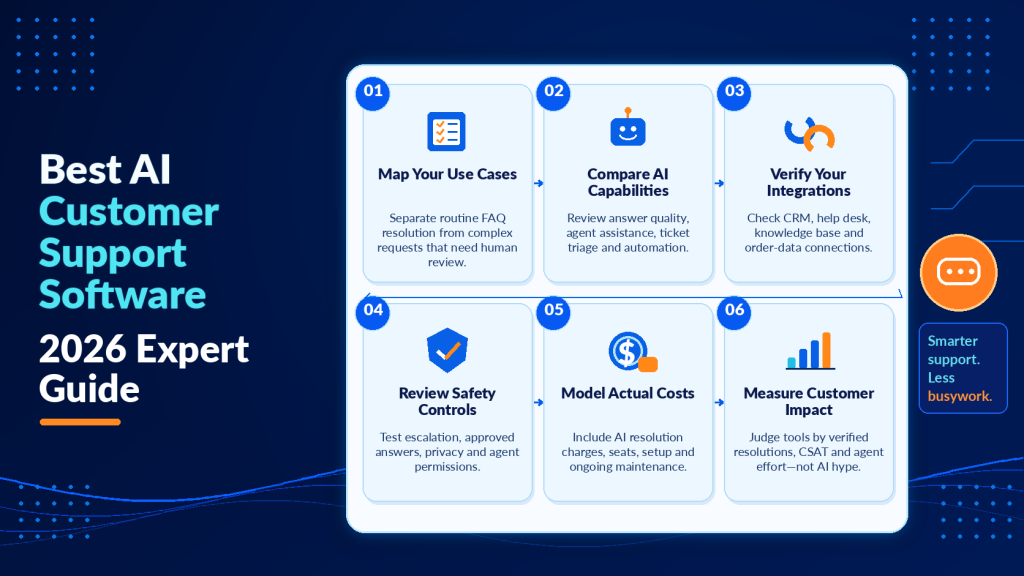
The companies that succeed with AI customer support audit their support data before buying.
Which tickets repeat most? Which ones actually need a human? That analysis should drive your shortlist. If you’re already thinking about how AI fits into broader communication workflows, the same principle applies to areas like using AI to write a B2B newsletter without it sounding like AI. The tool is only as good as the strategy behind it.
Implementing AI support without destroying customer experience
Here’s where most rollouts go wrong. The software works, but the implementation doesn’t.
Start with one channel and one use case
Don’t flip the switch across all channels on day one.
Pick your highest-volume, lowest-complexity channel (usually web chat) and deploy AI against your top five repetitive ticket types. Measure containment, CSAT, and escalation quality for 30 days before expanding.
This approach lets you catch hallucination issues and handoff gaps before they hit your most sensitive customer segments.
Build your knowledge base before you buy
Every AI customer support tool runs on your documentation.
If your help center is outdated, contradictory, or incomplete, the AI will reflect that. Budget two to four weeks for a knowledge base audit before go-live. Update articles, resolve conflicting information, and fill gaps for your top 20 ticket types.
This single step improves resolution rates more than any feature upgrade or plan tier.
Companies that understand how content quality drives engagement outcomes in other channels already grasp this principle.
Design the human handoff like it’s the product
The moment an AI conversation transfers to a human agent is the moment your customer is most frustrated.
They’ve already tried self-service and it didn’t work. If the agent then asks them to repeat their issue, you’ve actively made the experience worse than having no AI at all.
Define your escalation triggers explicitly. Pass full conversation history and customer context. And train your agents on how to pick up an AI-started conversation smoothly.

Pricing and ROI: what AI customer support software actually costs
Vendor pricing pages are deliberately confusing. Here’s what to watch for.
Most AI customer support platforms charge in one of three ways.
- Per seat (traditional helpdesk model)
- Per resolution (you pay when the AI successfully handles a conversation)
- Per conversation (you pay for every AI interaction regardless of outcome)
The per-resolution model sounds great until your volume spikes and your bill doubles in a month.
Ask about overage rates, minimum commitments, and what counts as a “resolution.” Some vendors count a conversation as resolved if the customer doesn’t respond within 24 hours. That’s abandonment.
Calculating real ROI
The math is straightforward.
Take your current cost per ticket (total support spend divided by ticket volume), multiply by the number of tickets AI realistically deflects, and subtract the software cost. If that number isn’t positive within six months, you’re either buying too much tool or your knowledge base isn’t ready.
A realistic first-year deflection target for most teams is a range.
Vendors who promise high deflection on day one are selling you a fantasy. The businesses that achieve high deflection rates invest heavily in improving content. For teams building content-driven workflows across departments, the same lesson shows up repeatedly, whether you’re outsourcing a B2B newsletter or deploying a support bot.
Frequently asked questions
Can you give me some examples of customer service chatbots?
Tidio is a common example for SMB teams that want a budget-friendly chatbot for basic FAQs and simple flows. Many helpdesk platforms also bundle chatbot functionality, but the key is confirming whether you are getting a scripted chatbot or a more autonomous AI agent before you buy.
What are some popular AI chatbots?
Popular options in customer support often include SMB-focused chatbots like Tidio, plus chatbot features bundled into larger support suites. When comparing “popular” tools, focus on whether they support reliable escalation, multilingual coverage, and safe behavior. Judge them on how polished the demo looks.
What AI can I speak to for free?
Many vendors offer free trials or entry tiers, but “free” often limits conversation volume, channels, or advanced features like integrations and analytics. If you are testing, use the trial to validate handoff quality and accuracy on your real ticket types.
Can I talk to AI privately?
It depends on the vendor’s data handling, retention policies, and whether conversations are used to train models. If privacy matters, ask for written details on storage duration, training opt-out options, access controls, and compliance coverage (for example, SOC 2 or GDPR) before deploying.
What security and compliance questions should you ask AI support vendors before signing?
Ask where data is stored, how long transcripts are retained, who can access them, and whether you can disable model training on your data. Also confirm SSO, role-based access, audit logs, and whether the vendor supports your required standards (SOC 2, GDPR, HIPAA where applicable).
How do you run a fair proof of concept when vendors can “demo-magic” the best-case scenarios?
Use a fixed set of real transcripts and your top ticket categories, then score outputs on accuracy, policy adherence, and clean handoff. Require the vendor to test in your environment or a sandbox with your knowledge base, and define success thresholds upfront.
What should you instrument after go-live so you can catch failures early without waiting for CSAT to drop?
Set up alerting for spikes in repeat contacts, high escalation rates on specific intents, and sudden increases in “no answer” or abandonment patterns. Pair quantitative signals with a weekly qualitative review of transcripts to spot new failure modes, content gaps, and risky replies before they spread.
What to do now
The platforms above can all deflect tickets and help agents work faster. But the outcome depends on the work you do before and after you sign the contract.
Start by pulling your ticket data from the last 90 days. Identify your top 20 repeat issues. Then audit your help center against those issues. Where are the gaps? Where is the content outdated or contradictory? Fix those first.
When you demo vendors, bring real transcripts and ask them to show you how their AI would handle those specific cases. Watch for how they escalate, how they admit uncertainty, and how cleanly they hand off to a human.
After go-live, measure containment rate, escalation quality, and repeat contact rate weekly. If deflection stalls below 30 percent after the first month, the problem is usually your knowledge base or your escalation triggers. Fix those before you blame the software.
AI customer support works when you treat it as a system, with the tool as one component. The companies that succeed invest as much effort in content, training, and measurement as they do in vendor selection.
Choose based on your data
AI customer support isn’t just about resolving more tickets automatically. It’s about knowing which customer questions AI can handle and when a human agent needs to step in.
Helploom brings AI-powered customer support, live chat, and ticket management into one platform. Its AI agents help handle repetitive questions and routine support requests, reducing the workload on your team while leaving more complex issues to human agents. Instead of investing in separate tools for automation and ticket management, you can manage both within a single support system.
Ready to put AI to work without complicating your support operations? Explore Helploom and see how combining AI automation with human support can help you reduce costs, improve response times, and deliver a better customer experience.