
Most support teams already know the answer to most of the tickets they handle. The problem is that a human still has to type the same password-reset instructions for the 47th time this week. AI help desk agents exist to absorb that repetitive load, but picking the wrong one (or deploying it badly) creates more chaos than it solves.
An InfotechLead report on Raleigh’s AI service-desk deployment found a 66% reduction in IT service-desk costs alongside a 98% deflection rate. Numbers like that sound impressive until you realize “deflected” does not always mean “resolved.”
Below, you will learn how to evaluate, deploy, and govern AI help desk agents so they actually fix problems instead of just hiding them.
Key Points
- A Raleigh AI service-desk deployment achieved a 66% reduction in IT service-desk costs and a 98% deflection rate, though deflection does not always mean the issue was actually resolved.
- AI help desk agents differ from chatbots by pulling from knowledge bases, interpreting intent, and taking action across connected systems like triggering refunds or routing tickets, rather than following scripted decision trees.
- When you evaluate AI help desk agents, prioritize knowledge source quality, how deeply they automate workflows, how they hand off to humans, how many integrations they cover, whether they provide governance and audit trails, and what they cost at your actual ticket volume and team size.
- Before you launch an AI agent, audit your help docs for accuracy because outdated articles generate confident-sounding wrong answers, and budget two to four weeks to clean up your knowledge base thoroughly depending on how much documentation debt you carry.
- Track how many tickets your AI agent resolves alongside how many it deflects from day one and add CSAT surveys to AI-handled conversations, because deflection rate only shows how many tickets the AI touched while resolution rate shows how many it actually solved.
- AI agents still struggle with billing disputes involving unusual circumstances, emotionally escalating complaints, and requests spanning multiple systems with no integration, so the best deployments treat the agent as a force multiplier rather than a replacement.
What are AI help desk agents?
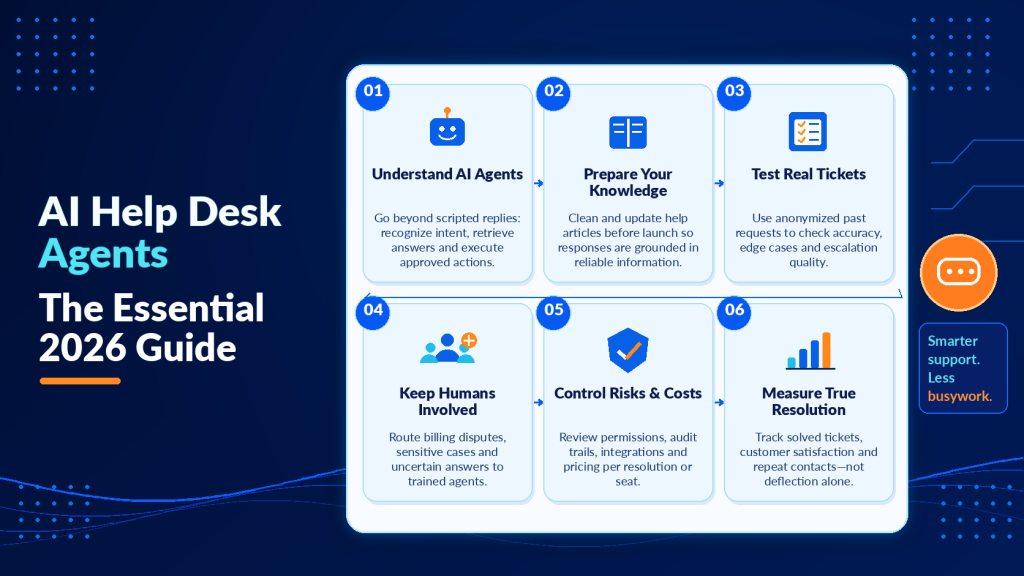
The distinction matters more than vendors want you to believe. A traditional chatbot follows a scripted decision tree. If the customer says X, it replies Y. An AI help desk agent pulls from a knowledge base, interprets intent, and takes action across connected systems.
Think of it this way.
A chatbot is a vending machine. Press the right button, get the right snack. An AI agent is closer to a junior support rep who can look up your account, check order status in a different tool, and trigger a refund without transferring you.
What AI agents actually do beyond chat
The real value shows up in workflows most people do not associate with “chat.” Ticket triage, SLA-based prioritization, auto-summarizing long threads, and intelligent routing to the right specialist eat hours that AI handles in seconds.
After-hours support is another area where agents outperform basic chatbots.
Instead of displaying “We’re closed, leave a message,” an AI agent can reset a password or surface the right help article at 2 a.m.
That said, AI agents still fail on ambiguous, emotionally charged, or multi-step edge cases. We will cover where to draw the line later.
How AI agents interpret intent and context
Unlike rule-based chatbots that match keywords, AI help desk agents use natural language understanding to grasp what the customer actually needs. When someone types “I can’t log in,” the agent considers whether they mean a forgotten password, an account lockout, a browser issue, or a service outage.
This intent recognition relies on training data from past tickets and conversations. The agent learns patterns over time. A customer who says “it’s broken again” gets routed differently if their account history shows three billing disputes versus three technical issues.
Context matters just as much as the words themselves. The agent tracks conversation history, account status, product tier, and previous interactions. When a customer follows up two days later with “any update?” the agent knows which ticket they mean without forcing them to repeat the case number.
Knowledge retrieval and grounding
AI agents answer questions by searching your knowledge base in real time. They do not memorize every article. They retrieve the most relevant documentation for each query and synthesize an answer grounded in that source material.
This retrieval process determines answer quality more than the underlying language model. An agent connected to accurate, well-structured documentation will outperform a more sophisticated model working from outdated or incomplete sources.
Grounding also provides a safety mechanism. When the agent cannot find a confident answer in approved documentation, it should escalate rather than guess. The best systems show which article or ticket the answer came from, so your team can audit responses and improve the knowledge base where gaps appear.
Action execution across systems
Modern AI agents do more than retrieve information. They execute tasks across your connected tools. A customer asks to change their subscription tier, and the agent updates the billing system, adjusts access permissions, and confirms the change without human intervention.
This capability depends entirely on integrations. The agent needs API access to your CRM, help desk, billing platform, and any other system where it will take action. Vendors differ wildly in how many pre-built connectors they offer and how easy it is to add custom ones.
Security controls become critical here. You need to define exactly which actions the agent can perform, which require approval, and which are off-limits entirely. A misconfigured agent with write access to your billing system can cause expensive mistakes at scale.

How to choose the right AI help desk agent for your team
Software comparison tables dominate this space, and they are useful to a point. The harder question is whether a given tool fits your environment.
A 10-person SaaS support team and a 200-seat IT service desk need fundamentally different things.
6 evaluation criteria that actually matter
Start with these, weighted by your situation.
- Knowledge source quality: Can the agent ingest your existing docs, past tickets, and internal wikis, or does it need everything reformatted?
- How deeply it automates workflows: Look beyond chat to see if it handles ticket creation, field population, routing, and status updates inside your existing help desk.
- How it hands off to humans: How smoothly does a conversation transfer to a live agent, and does context carry over or does the customer have to repeat themselves?
- How many integrations it covers: CRM, ITSM, e-commerce platforms, communication channels. Missing one key integration can derail your rollout.
- Whether it provides governance and audit trails: Can you review what the agent said, flag inaccurate responses, and restrict topics it should not touch?
- What it costs at your scale: Per-resolution pricing looks cheap until ticket volume spikes. Per-seat pricing punishes large teams. Model the math both ways.
Security is a filter you cannot skip. If the vendor cannot explain where your data lives and who accesses it, stop your evaluation there.
Internal IT service desk vs. customer-facing support
These are different buying decisions. Internal IT agents deal with predictable request types against a known user base. Password resets, access provisioning, and VPN troubleshooting follow documented patterns.
Customer-facing agents handle higher emotional variance, wider topic spread, and brand-reputation risk.
Do not assume a tool that excels at one will work for the other. Ask vendors which use case their product was built for. The honest ones will tell you.
Testing before you commit
Run a proof of concept with real ticket data before you sign a contract. Anonymize customer information, then feed the agent 50 to 100 actual support conversations from the past quarter. How many does it resolve correctly? Where does it fail? Does it escalate appropriately or try to bluff through gaps in knowledge?
This test reveals more than any demo. Vendors optimize demos for their best-case scenarios. Your ticket data shows how the agent performs in your actual environment with your terminology, your product complexity, and your customer communication style.
Pay attention to edge cases during testing. The agent might handle most tickets beautifully and completely fail on a significant minority. You need to know which ones before you go live.
How to roll out AI help desk agents safely
Deployment is where most teams stumble. The technology works. Your organizational readiness does not.
Here is a step-by-step approach that reduces risk.
Step 1: Define a narrow pilot scope
Pick three to five high-volume, low-complexity ticket categories. Password resets, order-status inquiries, and basic how-to questions are classic starting points.
Resist the temptation to automate everything at once.
Step 2: Prepare your knowledge base
Your AI agent is only as good as the information it draws from. Audit your help docs for accuracy and freshness.
Outdated articles generate confident-sounding wrong answers, which is the worst possible outcome.
This step takes longer than most teams expect. Budget two to four weeks to clean up your knowledge base thoroughly, depending on how much documentation debt you carry.
Step 3: Design escalation paths before launch
Every AI agent needs clear rules for when to hand off. Build escalation triggers around these signals.
- Customer expresses frustration or asks to speak with a human
- The agent’s confidence score drops below a threshold you set
- The conversation exceeds a defined number of turns without resolving the issue
- The topic falls outside the agent’s approved scope
If you skip this step, you will discover the gaps through angry customer reviews. Not ideal.
Step 4: Run QA cycles before going live
Have your support team test the agent with real anonymized ticket scenarios. Track where it gives wrong answers, where it loops, and where it fails to escalate.
Fix those patterns before customers encounter them.
Step 5: Measure resolution alongside deflection
What percentage of the tickets your AI agent touches actually get solved without further human intervention?
Deflection rate tells you how many tickets the AI touched. Resolution rate tells you how many it actually solved. Track both from day one, and add CSAT surveys to AI-handled conversations so you catch quality problems early.
Step 6: Monitor and iterate post-launch
Launch begins your tuning work. Review a sample of AI-handled conversations weekly for the first month. Look for patterns in escalations, low-confidence responses, and customer dissatisfaction.
Your knowledge base will need updates as you discover gaps. Your escalation rules will need adjustment as you see where the agent overreaches or gives up too early. Treat the first 90 days as active learning.
Assign someone to own this ongoing improvement process. Without a clear owner, the agent’s performance will drift as your product, policies, and customer needs evolve.

AI help desk software costs: What to budget
Pricing models vary wildly, which makes apples-to-apples comparison frustrating. Most vendors use one of three structures.
| Pricing Model | Best For | Watch Out For |
|---|---|---|
| Per seat/month | Large teams with high volume | You pay even during slow months |
| Per resolution | Small teams testing the waters | Costs spike unpredictably with volume |
| Platform fee + usage | Mid-market with steady growth | Hidden overage charges above tier limits |
Run your own cost model. Multiply your average monthly ticket volume by the vendor’s per-resolution rate, then compare that against per-seat pricing at your team size.
The cheaper option often flips depending on how much you automate.
Do not forget setup costs. Preparing your knowledge base, building integrations, and training your team on the new workflow all carry real time and dollar costs that vendor quotes conveniently omit.
Hidden costs to account for
Beyond the vendor’s quoted price, budget for ongoing knowledge-base maintenance. Someone needs to update your docs as your product changes, review flagged responses, and refine the agent’s training data. This is a recurring task.
Maintaining integrations also adds up. APIs change, systems get upgraded, and connections break. Plan for a few hours per quarter to keep your integrations running smoothly.
If you replace an existing help desk rather than layer AI on top, factor in migration costs. Moving historical ticket data, retraining your team on a new interface, and rebuilding custom workflows all take time and focus away from serving customers.
Should you replace your help desk or layer AI on top?
If your current help desk platform works, layering an AI agent on top is usually the smarter first move. Zendesk, Freshdesk, ServiceNow, and Jira Service Management all support AI integrations.
You keep your existing workflows, reporting, and integrations intact.
Full replacement makes sense only when your current stack is truly broken. Poor API access, no modern integrations, or a vendor that is sunsetting features all justify a switch. Ripping and replacing mid-operation is expensive and risky. Approach it only when the pain of staying outweighs the pain of switching.
Teams focused on automation workflows for B2B operations often find that layering AI on top of existing tools creates the fastest path to measurable ROI without disrupting what already works.

Where AI help desk agents still fail
Honesty here earns you more than hype. AI agents struggle with situations that require judgment, empathy, or cross-departmental knowledge that is not documented.
Billing disputes involving unusual circumstances, complaints that escalate emotionally, and requests that span multiple systems with no integration still need humans.
The best AI deployments treat the agent as a force multiplier for your team.
And if your knowledge base is thin or outdated, no AI agent will save you. Garbage in, confident garbage out. The teams who communicate most effectively with customers through clear, well-crafted messaging tend to maintain better documentation habits overall, and their AI agents perform noticeably better as a result.
One more blind spot is multilingual support. Most AI agents handle English well. Performance drops significantly in other languages, especially for domain-specific vocabulary.
Test in every language you plan to support.
When to force human escalation
Some ticket types should bypass the AI agent entirely. Legal threats, data breach reports, and executive escalations need immediate human attention. Configure your routing rules to recognize these patterns and escalate automatically.
Customers who have contacted you multiple times about the same issue should also skip the AI queue. Forcing them through another automated interaction when they are already frustrated compounds the problem.
High-value accounts often warrant special treatment. A customer on your enterprise tier with a contract renewal coming up deserves a human touch, even if their question is technically something the AI could handle.
What to do next with your AI help desk agent
You now understand how AI help desk agents differ from chatbots, where they deliver value, and where they still fail. The teams that succeed start narrow, measure what matters, and iterate based on real ticket data rather than vendor promises.
Clean your knowledge base before you launch. Design escalation paths before customers hit them. Track how many tickets your agent resolves, and watch for patterns in where it struggles.
Start with three to five high-volume ticket categories. Prove the ROI there, then expand deliberately. Teams that rush to automate everything on day one often roll it back three months later when the quality problems compound.
Your AI agent will perform only as well as the documentation and workflows you build around it. Invest in that foundation, and the technology will deliver. Skip it, and you will spend more time fixing AI mistakes than you would have spent answering tickets manually.
Frequently asked questions
Can AI do help desk jobs?
AI can handle many high-volume, repeatable help desk tasks, especially when the issue is well-documented and the steps are predictable. For complex, ambiguous, or emotionally charged situations, the best results come from AI handling the first line and routing to humans when needed.
Are there AI customer service agents?
Yes, AI customer service agents exist and can do more than answer questions. They can take actions like updating orders, issuing refunds, or changing account details when integrated with your systems. The key is choosing an agent that supports secure workflows, reliable integrations, and clear human handoff.
Can I use ChatGPT for customer service?
You can use ChatGPT for customer service content and assisted responses, but using it as a frontline agent typically requires guardrails, auditing, and tight integration with your help desk and data sources. For production support, many teams prefer purpose-built help desk agents with access controls, logging, and workflow support.
Which AI model is best for customer service?
The best model depends on your requirements for accuracy, latency, data privacy, multilingual performance, and tool integrations. In practice, you should evaluate models by running them against real ticket transcripts and measuring outcomes like correctness, containment quality, and safe escalation behavior.
What KPIs should I track to prove ROI from an AI help desk agent?
Track business outcomes that map to cost and customer impact. Cost per resolved ticket, time to resolution, escalation rate, and recontact rate within 7 to 14 days all matter. Pair those with quality signals like QA score or human review pass rate to ensure savings are not coming from missed issues.
How do I prevent an AI help desk agent from giving risky answers in regulated or sensitive workflows?
Use least-privilege access, topic allowlists and blocklists, and approval steps for sensitive actions. Billing changes, account access, and compliance topics all need safeguards. Add mandatory citations to internal sources where possible, and require human review when the agent cannot confidently ground its response in approved documentation.
What is a realistic timeline and resourcing plan for implementing an AI help desk agent at mid-market scale?
Plan for a phased rollout. Initial discovery and integration, a controlled pilot, then staged expansion across categories and channels. A realistic resourcing mix includes a support operations owner, a knowledge base editor, an IT or integration lead, and a QA reviewer to test and tune performance before broad release.
Let AI handle routine support while your team focuses on what matters
Your support team shouldn’t have to answer the same questions dozens of times a day. But automating those conversations shouldn’t leave customers stuck with a chatbot that can’t resolve their problems.
Helploom combines AI-powered customer support, live chat, and ticket management in one platform. Its AI agents can answer common questions around the clock, helping reduce repetitive inquiries and giving customers faster access to information. Meanwhile, your human agents can focus on complicated requests, sensitive issues, and conversations that require personal attention.
With automation and ticket management working together, Helploom helps businesses keep support workloads manageable, reduce manual effort, and handle increasing customer demand without expanding their teams at the same rate.
Ready to put AI to work in your help desk? Explore Helploom and see how AI-powered support can help you resolve routine inquiries faster, reduce operational costs, and give your team more time to handle the issues that matter most.