
An AI customer service chatbot won’t fix a broken support team. But if your support processes are sound and your knowledge base is solid, the right chatbot can cut response times in half and free your agents to handle the work that actually requires a human brain.
Gartner surveyed over 3,500 customers and found only 7% had used a chatbot during their most recent service interaction, while 49% said they’d be willing to try one. That gap between how many people have access and how many would use it is your opportunity.
Below, you’ll get a practical framework for choosing, building, and running a customer service chatbot that actually resolves issues instead of creating new ones.
Key Points
- Gartner surveyed over 3,500 customers and found only 7% had used a chatbot during their most recent service interaction, while 49% said they’d be willing to try one, revealing a gap between how many people have access and how many would use it that represents a clear opportunity.
- A case study published in Information showed a micro-enterprise chatbot handled roughly 61% of February inquiries and dropped average response time from 115 minutes to 88 minutes, demonstrating that you don’t need enterprise scale to see real gains when you automate the right workflows.
- CMSWire reported that only 4% of customer service leaders hit their expected returns because they implemented poorly.
- AI chatbots hallucinate and generate plausible-sounding answers that are completely wrong, especially when the knowledge base has gaps or ambiguous content, which means anything involving medical advice, financial transactions, legal obligations, or account security should route to a human.
- The best-performing chatbots run on a weekly review cadence where you review conversations where the bot failed, fix the clustered failure categories like missing knowledge base content or misidentified intent, and re-test in a continuous cycle.
What is an AI customer service chatbot and how does it work?
A traditional chatbot follows scripted decision trees. You click “track my order,” it asks for an order number, it returns a status.
The interaction is rigid and breaks the moment you phrase something unexpectedly.
An AI customer service chatbot works differently. It uses natural language processing to interpret what you mean. The system pulls answers from connected knowledge bases, CRM records, and order management systems, then generates a contextual response based on your actual intent.
Intent detection and context retention
The core mechanism detects intent. When you type “I never got my package and I want a refund,” the chatbot identifies two intents: delivery status inquiry and refund request.
It then routes or responds accordingly.
Context retention separates a usable chatbot from an infuriating one. If you explain your problem in message one, you shouldn’t need to repeat it in message three. The best systems carry conversation context across multiple turns and even across channels, so you can start on web chat, continue via email, and pick up where you left off without re-explaining anything.
This context layer connects to your existing customer data. When you ask about your order, the bot already knows your purchase history, shipping address, and previous support interactions. It can reference past conversations, anticipate follow-up questions, and personalize responses based on your account status or customer segment.

6 customer service automation workflows to launch first
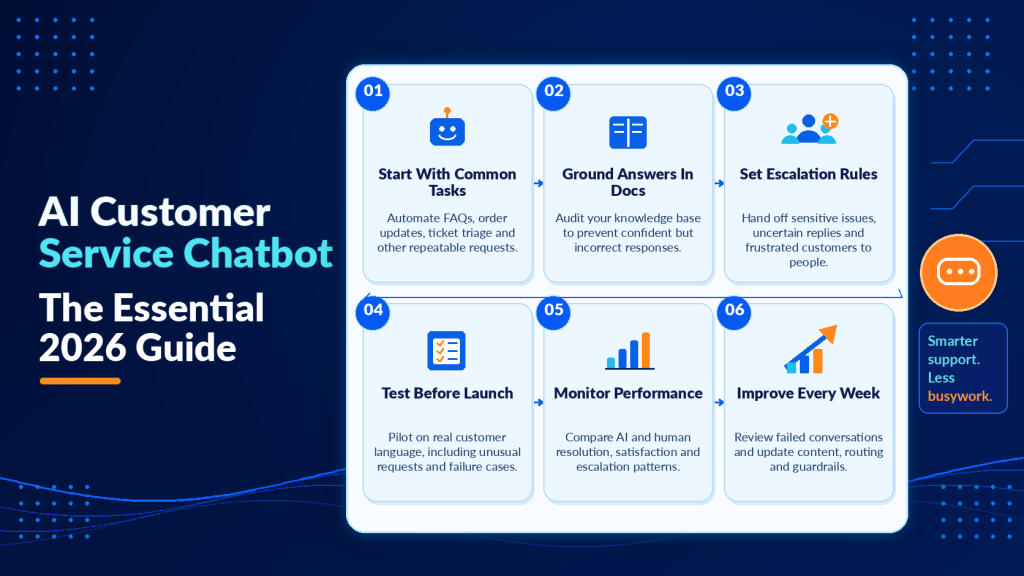
Don’t try to automate everything on day one. Start with the repetitive, high-volume requests that eat up agent time without requiring judgment calls.
Order tracking and FAQ resolution
Order status inquiries typically make up a significant portion of support tickets for ecommerce teams. A chatbot connected to your OMS can resolve these in seconds.
FAQ resolution works the same way. Connect your help center, and the bot surfaces the right article without a human ever seeing the ticket.
The key is structuring your knowledge base so the bot can match customer questions to the right content. Tag articles by topic, product, and common phrasing. Test with real customer queries to verify the bot retrieves accurate answers, then refine your tagging and article structure based on what fails.
Password resets, returns, and ticket triage
Password resets are pure automation gold.
No judgment required, no edge cases.
Returns and exchanges need slightly more nuance. Your bot should confirm eligibility based on purchase date and policy rules, generate a return label, and escalate only if the request falls outside policy. Build in checks for return windows, product condition requirements, and any exceptions like final sale items or custom orders.
Ticket triage is where you automate strategically. Rather than replacing agents, the chatbot categorizes incoming requests by topic, urgency, and sentiment, then routes them to the right specialist.
This alone can shave minutes off average handle time.
Set up routing rules that consider both the issue type and your value or history. VIP customers with billing questions go to your senior team. First-time buyers with simple product questions go to your general queue. The bot handles the sorting so your agents spend zero time deciding who should handle what.
Post-interaction CSAT collection
Most teams forget this one. After a resolved conversation, the chatbot triggers a satisfaction survey.
You collect feedback at scale without agents manually sending follow-ups.
The data feeds back into how you improve the system, which we’ll cover shortly. Track CSAT by issue type, agent, and how you resolved the case. If bot-handled password resets score higher than agent-handled ones, that’s a signal to expand what you automate. If returns processed by the bot score lower, dig into why and fix the flow before scaling it.
A case study published in Information (MDPI) showed a micro-enterprise chatbot handled roughly 61% of February inquiries and dropped average response time from 115 minutes to 88 minutes. That’s a small business with limited resources.
The lesson? You don’t need enterprise scale to see real gains when you automate the right workflows.
AI chatbot features that separate good from useless
Every vendor claims “AI-powered” on their landing page. Here’s what to actually evaluate when you’re comparing options.
Omnichannel deployment
Your customers don’t live on one channel. A chatbot that works only on your website while your support volume pours in through WhatsApp, email, and Instagram DMs is solving half the problem.
Look for native support across your actual channels.
Verify that the platform can maintain conversation context when you switch from web chat to email or from Facebook Messenger to SMS. If each channel treats the conversation as new, you lose the continuity that makes AI chatbots valuable in the first place.
Sentiment detection and human handoff
This is the feature most teams undervalue until it’s too late. When your frustration escalates, the chatbot should detect that shift in tone and route to a live agent immediately, with full conversation context attached.
The handoff experience matters enormously.
If you have to re-explain everything to the human agent, the experience is actually worse than no chatbot at all.
Test how you hand off during your pilot. Simulate frustrated customers. Verify that agents receive the full transcript, the detected intent, and any account details the bot already pulled. The transition should feel seamless, with the agent picking up mid-conversation rather than starting over.
Analytics and containment tracking
You need visibility into several metrics. Track what percentage of conversations the bot resolves without human help. Measure first response time, how long it takes to resolve, and CSAT scores segmented by bot-handled versus agent-handled conversations.
Without this data, you’re guessing whether the chatbot is helping or hurting.
Similar to how businesses building newsletter automation workflows for B2B need clear performance metrics, your chatbot requires measurement infrastructure from day one. Set up dashboards that show containment rate by issue type, average time to resolve by channel, and how often each trigger escalates. Review these weekly and adjust your flows based on what the data reveals.

How to implement an AI customer service chatbot without hurting CX
Here’s where most deployments go wrong. CMSWire reported that only 4% of customer service leaders hit their expected returns because they implemented poorly.
Step 1: Audit and prepare your knowledge base
Your chatbot is only as accurate as the information it draws from. Before you connect anything, audit your help center articles, product documentation, and policy pages.
Remove outdated content. Fill gaps in coverage.
If your knowledge base is a mess, your bot will confidently serve wrong answers, which is worse than no answer at all.
Review your top 50 support tickets from the past quarter. Identify recurring questions that lack a clear help article. Write those articles before you launch the bot. Structure each piece with a clear question as the title, a direct answer in the first paragraph, and step-by-step instructions if resolving the issue requires multiple actions. Tag each article with the intents it should match so your bot can retrieve it accurately.
Step 2: Design conversation flows with escalation rules
Map out your top 10 request types by volume. For each one, define the happy path where the bot resolves it, the edge case path where the bot needs clarification, and when the bot hands to a human.
Set explicit escalation triggers.
Include repeated failed intent matches, negative sentiment detection, requests involving billing disputes or account security, and any conversation that exceeds a set number of turns without resolution. Write these rules into your platform configuration so the bot knows exactly when to step aside.
Test each flow with real customer language. Use actual ticket transcripts to simulate conversations. Verify that the bot handles common phrasing, typos, and multi-part questions. Adjust your intent models and escalation logic based on what breaks during testing.
Step 3: Run a controlled pilot
Route a small portion of incoming conversations to the chatbot. Monitor containment rate, CSAT, and how often you escalate daily for at least two weeks.
We see this pattern constantly. Teams launch to everyone, get a spike in complaints, and blame the technology.
The technology was fine. The rollout was reckless.
During your pilot, assign someone to review every escalated conversation. Look for patterns in what the bot missed, where it gave incorrect answers, and where customers expressed frustration. Use this feedback to refine your knowledge base, adjust how you detect intent, and tighten escalation rules before you expand to more traffic.
Step 4: Optimize based on real conversation data
After your pilot, review the conversations where the bot failed. Most failures cluster into a few categories: missing knowledge base content, misidentified intent, or unclear escalation logic.
Fix those categories and re-test.
This cycle doesn’t stop after launch. The best-performing chatbots run on a weekly review cadence. Schedule a standing meeting where support, product, and content teams review the previous week’s failed conversations, prioritize fixes, and deploy updates. Track how each change affects containment rate and CSAT so you know which improvements actually move the needle.
If your team is already applying data-driven thinking to areas like content marketing, understanding the business case for a B2B newsletter follows the same measurement-first logic you’ll need when you improve your chatbot.
Where AI chatbots fail and when humans must step in
We’d be dishonest if we didn’t address this directly. AI chatbots hallucinate.
They generate plausible-sounding answers that are completely wrong, especially when the knowledge base has gaps or ambiguous content.
Compliance-sensitive and high-stakes requests
Anything involving medical advice, financial transactions, legal obligations, or account security should route to a human. The liability you expose yourself to when a chatbot gives incorrect guidance in these areas far outweighs the cost savings from automation.
Think of it like a triage nurse. The nurse handles intake and routing efficiently, but the diagnosis still comes from a doctor.
Your chatbot handles intake. Your agents handle diagnosis.
Configure hard stops for regulated topics. If you mention a refund dispute over a certain amount, a chargeback, a data deletion request, or any medical or legal question, the bot should immediately route to a specialist with the full context attached. Don’t rely on sentiment detection alone for these cases. Build explicit keyword and intent triggers that guarantee human review.
Emotionally charged and multi-issue conversations
If you’ve been charged twice, received a damaged product, and have been waiting three days for a response, you don’t want to talk to a bot. Sentiment detection should catch these cases early, but you also need hard rules.
If a conversation involves multiple unresolved issues or an account in a specific status, it goes to a human.
That Gartner survey also found some customers would try a chatbot again after a negative experience. You get one shot at getting this right for each customer. Don’t waste it on edge cases the bot can’t handle.

How to choose the right AI chatbot for customer support
Vendor comparison pages won’t tell you what matters for your specific support environment. Instead, evaluate against these criteria.
Does it integrate with your existing stack? Check for native connectors to your CRM, helpdesk, order management, and communication channels.
API availability matters, but pre-built integrations save months of development time.
What training sources does it support? Some platforms work only with structured FAQs. Others can ingest PDFs, past ticket transcripts, and product databases. The more flexible the training, the faster you reach useful coverage. Ask vendors to demonstrate how you would upload your existing documentation and how the bot would index and retrieve it during a live conversation.
How does it handle languages? If you serve a multilingual customer base, verify that the NLP models support your specific languages. Test with actual customer queries in those languages. Don’t rely on a vendor’s language list. Run your own pilot with real tickets in Spanish, French, German, or whatever languages your customers use, and measure whether the bot understands intent and retrieves the right content.
What does the analytics layer look like? If you can’t segment performance by topic, channel, and how you resolved the case, you can’t improve the system.
Companies that treat their chatbot as a “set and forget” tool consistently underperform, just like businesses that outsource their B2B newsletter without tracking engagement metrics.
Demand granular reporting before you sign.
Finally, evaluate how the vendor approaches AI governance. Do they offer controls for approved answer sources? Can you restrict the bot from generating responses outside your knowledge base? Grounded answers from approved sources prevent the hallucination problem we discussed earlier. Ask how the platform handles cases where the bot doesn’t find a confident match. The best systems admit uncertainty and escalate rather than guessing.
Frequently asked questions
How do I estimate ROI for an AI customer service chatbot before buying?
Start with current ticket volume, the blended cost per interaction, and the share of contacts that are eligible for automation. Then model best-case and conservative scenarios using expected containment and deflection rates, plus any revenue you protect from faster replies, like fewer cancellations or chargebacks.
What governance controls should we require to reduce AI risk and brand mistakes?
Ask for role-based permissions, an approval workflow when you update knowledge, and the ability to lock responses to verified sources. You should also require full conversation logging, audit trails for changes, and configurable disclaimers for regulated topics.
How should teams structure ownership between support, IT, and marketing after launch?
Support should own customer experience outcomes and escalation policies, IT should own integrations, security, and uptime, and marketing or content ops should own knowledge content quality and tone. A lightweight weekly triage meeting keeps improvements moving without creating bottlenecks.
How do we keep the chatbot’s tone consistent with your brand voice across channels?
Create a short style guide that defines voice, do and do not phrases, and how to handle apologies, refusals, and policy explanations. Test the same scenarios on every channel, then tune prompts and templates so the experience feels consistent whether it is chat, social DMs, or email.
What security and privacy requirements should we validate during vendor review?
Confirm encryption in transit and at rest, data retention controls, and options to redact or mask sensitive fields. Also verify single sign-on, access logs, regional data hosting if you need it, and whether customer data is used to train models by default or only with explicit opt-in.
How can we train agents to work effectively with a chatbot rather than around it?
Provide short playbooks for common handoff scenarios, including how to read bot context quickly and what questions to ask next. Reinforce that you measure agents on how well they resolve and customer outcomes.
What should an AI chatbot disaster recovery plan include?
Build a fast rollback path to human-only handling, plus a kill switch for specific intents or channels. Include monitoring alerts for spikes in escalations or negative feedback, a communication template for customers, and a process to patch content or integrations before you re-enable automation.
Start small, measure everything, scale what works
An AI chatbot should do more than answer frequently asked questions. It should help your team manage growing support volumes, reduce repetitive work, and make sure customers still receive human assistance when they need it.
Helploom combines AI-powered customer support, live chat, and ticket management in one platform. Its AI agents can handle routine inquiries around the clock, while your human support team focuses on requests that require more attention. Instead of managing separate chatbot and help desk systems, you can streamline customer conversations within a single support platform.
The result is a more manageable support workload, faster responses to common questions, and more time for your agents to resolve complicated customer issues.
Ready to put AI to work in your customer support operations? Explore Helploom and see how AI automation and human support can work together to deliver more efficient, cost-effective customer service.