
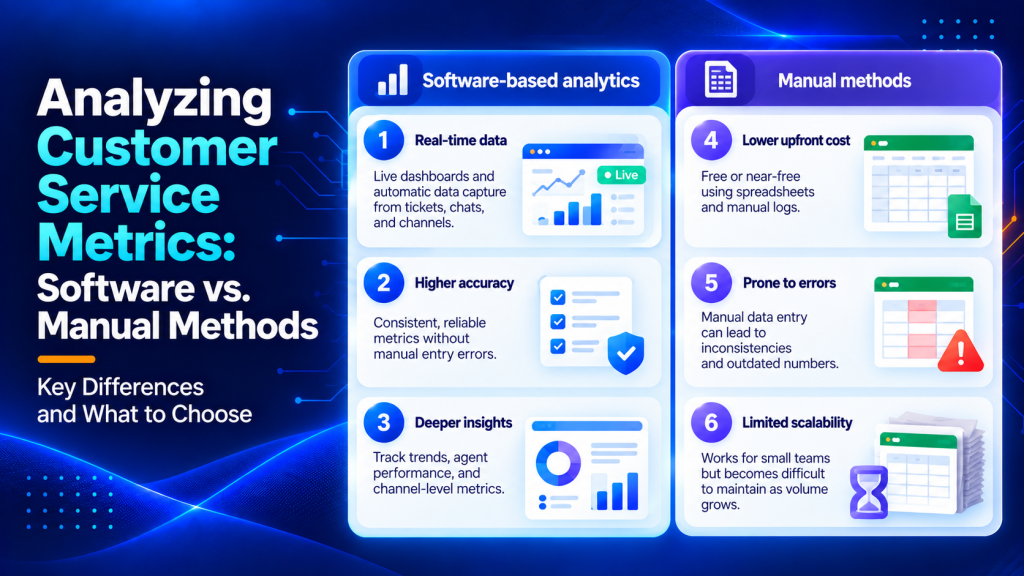
Tracking customer service metrics in a spreadsheet feels productive right up until the moment you need to act on them. The numbers are stale by the time you’ve finished copying them, the formulas break when someone edits the wrong cell, and nobody trusts the data enough to make a real decision from it.
That gap between “we have numbers” and “we know what to do” is where most support teams get stuck. Software-driven analytics and manual tracking methods each come with trade-offs that depend on your team size, budget, and how fast you need to respond. Below, you’ll find a direct comparison of both approaches, a breakdown of which metrics matter most, and a clear verdict on when to make the switch.
Key Points
- First Response Time is the single metric to fix before anything else because customers form their impression of your support quality within the first few minutes of waiting.
- Manual tracking breaks down once you pass five agents or support more than one channel, since consistent data entry becomes unrealistic and consolidating different formats turns into a part-time job.
- Customer Effort Score correlates strongly with retention, making it especially useful for identifying metrics that matter for long-term B2B relationships rather than one-off satisfaction.
- Software-based analytics let you set thresholds and trigger alerts in real time, so if average first response time crosses five minutes you get notified immediately instead of discovering it in a monthly review.
- Low First Contact Resolution usually points to knowledge gaps or poor routing, and pressuring teams to close tickets faster often just shifts the problem to reopened tickets and repeat contacts.
What are customer service metrics?
Customer service metrics are quantifiable measures that track how effectively your support team responds to and resolves customer inquiries. They capture both operational performance (speed, efficiency, workload) and customer sentiment (satisfaction, effort, loyalty).
The right metrics tell you whether customers are getting help quickly, whether that help actually solves their problem, and how the experience affects their perception of your brand.
Before getting into the details, here’s a side-by-side summary of how software-based and manual tracking methods stack up across the factors that matter most to support leaders.
| Factor | Software-Based Analytics | Manual Methods (Spreadsheets, Logs) |
|---|---|---|
| Setup time | Hours to days (depending on integrations) | Minutes for a basic spreadsheet |
| Data accuracy | High; auto-captured from tickets and chats | Prone to entry errors and outdated inputs |
| Real-time visibility | Live dashboards and alerts | Delayed; requires manual refresh |
| Scalability | Handles thousands of tickets per day | Breaks down past ~50 tickets/day |
| Cost | Monthly subscription (varies by seats) | Free or near-free |
| Reporting depth | Channel-level, agent-level, trend analysis | Aggregated totals, limited drill-down |
| Learning curve | Moderate; training needed for advanced features | Low; most teams already know spreadsheets |
| Best for | Teams with 5+ agents or multi-channel support | Solo operators or very early-stage teams |
That table tells most of the story.
But the real differences show up in how each method handles the metrics that actually drive decisions.

Which customer service metrics deserve the most attention?
We’d group the metrics that matter into two categories. Experience metrics show what customers feel. Efficiency metrics show how your team performs.
The distinction matters because improving one doesn’t automatically fix the other.
Experience metrics that reveal customer sentiment
CSAT (Customer Satisfaction Score) measures how happy a customer feels right after an interaction. It’s the most direct signal you have, but it’s also the most volatile. A single bad handoff can tank it.
CES (Customer Effort Score) asks a different question. How hard did the customer have to work to get help?
Low-effort experiences correlate strongly with retention, which makes CES especially useful if you’re trying to identify the B2B metrics that actually matter for long-term relationships rather than one-off satisfaction.
NPS (Net Promoter Score) captures broader loyalty. It’s less actionable on a ticket-by-ticket basis but valuable for spotting macro trends over quarters.
Each of these metrics reveals a different layer of the customer experience. CSAT tells you whether the immediate interaction went well. CES predicts whether customers will come back or look for alternatives. NPS shows whether they’ll recommend you to others, which matters especially in B2B markets where word-of-mouth drives pipeline.
The mistake most teams make is tracking all three but acting on none of them. Pick the one that aligns most closely with your current business goal. If you’re fighting churn, prioritize CES. If you’re trying to improve referrals, focus on NPS. If you need to diagnose what’s breaking in day-to-day interactions, start with CSAT.
Efficiency metrics that expose operational gaps
First Response Time (FRT) is the single metric we’d fix before touching anything else.
Customers form their impression of your support quality within the first few minutes of waiting. A fast first response buys goodwill even if the full resolution takes longer. Slow FRT, on the other hand, sets a negative tone that’s hard to recover from.
Track FRT by channel. Email might have a four-hour target while live chat needs to stay under two minutes. Mixing them into one number hides the real problem.
First Contact Resolution (FCR) tells you whether customers get answers without bouncing between agents or channels. Low FCR usually points to knowledge gaps or poor routing.
If customers keep reopening tickets or escalating to supervisors, your team either lacks the information to solve problems or lacks the authority to make decisions. Both are fixable, but you need to know which one you’re dealing with.
Average Handle Time (AHT) is useful in context but dangerous in isolation. Pressuring agents to close tickets faster often just shifts the problem to reopened tickets and repeat contacts.
Use AHT to spot outliers. If one agent consistently takes twice as long as the rest, they might need coaching or they might be handling a disproportionate share of complex cases. The metric alone won’t tell you which.
Ticket Volume and Backlog show whether your team can keep up with demand. Rising backlog means you’re understaffed, your processes are inefficient, or you’re getting hit with a wave of issues that points to a product or service problem upstream.
SLA Compliance measures how often you meet the response and resolution commitments you’ve made to customers. Missing SLAs consistently erodes trust and can trigger contract penalties in B2B relationships.
Manual tracking can technically capture all of these. The question is whether you can capture them fast enough to act before the pattern gets worse.
Where manual customer service tracking breaks down
Spreadsheets work fine when you’re logging ten tickets a day and the person reading the report is the same person entering the data.
That setup rarely survives the first growth spurt.
Here’s what typically goes wrong.
- Lag time kills relevance. By the time someone exports ticket data, cleans it, and builds a pivot table, the numbers describe last week’s problems, so if first response time spiked on Tuesday, you’re finding out on Friday.
- Inconsistent tagging. Without enforced categories, one agent tags an issue as ‘billing’ while another tags the same type as ‘payment error,’ resulting in phantom categories in your reporting.
- No channel-level breakdown. A spreadsheet might tell you total tickets resolved, but it won’t easily show you that email resolution takes longer than chat or that phone calls generate higher CSAT scores.
- Formula fragility. One deleted row or misplaced column reference and your SLA compliance calculation is quietly wrong for weeks.
The bigger issue is what manual tracking prevents you from seeing. You can’t spot patterns across agents or shifts without spending hours building custom reports. You can’t correlate ticket volume with marketing campaigns or product releases unless you manually cross-reference dates. You can’t identify which knowledge base articles reduce repeat contacts because that requires linking ticket content to resolution paths.
None of this means spreadsheets are useless. For a two-person support team operating on a single channel, manual tracking is fine and honest about its limits.
The danger is staying on spreadsheets after you’ve outgrown them because the switching cost feels high.

How software-driven customer service analytics change the game
The core advantage of dedicated software is that the data arrives without anyone having to enter it.
When a ticket opens, gets assigned, receives a first reply, and closes, every timestamp is recorded automatically. That eliminates the biggest weakness of manual tracking: human data entry.
You get FRT, resolution time, and AHT calculated in real time across every agent and channel.
Dashboards built for different stakeholders
Good customer service software lets you build views tailored to who’s looking. An agent sees their own queue and personal metrics. A team lead sees SLA compliance and FCR across the shift. An executive sees CSAT trends and cost-per-resolution over the quarter.
That layered visibility is nearly impossible to replicate in spreadsheets without building a small reporting infrastructure from scratch.
Similarly, understanding your ROI from communication channels requires consistent, automated measurement rather than manual guesswork.
Turning metrics into action
Software collects data and lets you set thresholds and trigger alerts.
If average first response time crosses five minutes, you can get notified immediately rather than discovering it in a monthly review.
That’s the real shift. You move from retrospective reporting to proactive management. You stop asking “what happened last month?” and start asking “what’s happening right now that we can fix?”
Alerts can route to the right person based on severity. A minor SLA breach might ping the team lead. A major CSAT drop might escalate to the head of support. The system handles the monitoring so your team can focus on solving the problem instead of hunting for it.
When to switch from spreadsheets to software
There’s no universal trigger, but a few signals reliably predict that manual tracking is costing you more than it saves.
Your team has grown past five agents. At that point, consistent data entry becomes unrealistic without dedicated admin time.
You support customers across more than one channel. Email, chat, and phone each produce different data in different formats.
Consolidating them manually is a part-time job.
You need to prove support ROI to leadership. Executives want trend lines and cost-per-resolution numbers. If you’re regularly auditing your performance across channels, software gives you the data in the format leadership expects.
Your CSAT or FCR numbers feel unreliable. If no one trusts the data, the tracking system isn’t doing its job regardless of how it’s built.
One honest caveat: some teams switch to software too early and end up paying for features they don’t use. If you handle fewer than 20 tickets a day on a single channel, a well-maintained spreadsheet with clear tagging rules might serve you for another year.

What to prioritize in customer service software for better reporting
When you evaluate platforms specifically for reporting, focus on these areas.
Omnichannel data aggregation. The tool should pull metrics from every support channel into one view. If you still need to export and merge data manually, the software hasn’t solved the core problem.
SLA tracking and alerting. You need automated flags when response or resolution times approach your thresholds.
Agent-level reporting. Team averages hide individual performance issues. The ability to see per-agent FRT, CSAT, and ticket volume lets you coach effectively.
Tagging and categorization enforcement. Mandatory ticket tags eliminate the inconsistency problem that plagues manual tracking. Look for platforms that offer required fields before an agent can close a ticket.
Historical trend analysis. You need to compare this month’s performance to last month, last quarter, and the same period last year. Platforms that only show current snapshots force you back into spreadsheets for any longitudinal analysis.
Custom report builders. Pre-built dashboards cover common use cases, but every team eventually needs a report the vendor didn’t anticipate. The ability to filter, group, and visualize data without writing SQL separates flexible platforms from rigid ones.
Export and API access. Even with great native reporting, you’ll occasionally need to pull data into a business intelligence tool or share it with stakeholders who don’t have platform access. Clean CSV exports and a documented API make that possible.
Tools like Mailshake also show how purpose-built platforms outperform generic solutions when it comes to outreach analytics and engagement tracking. The same principle applies to support: specialized software beats generalized spreadsheets once your operation reaches a certain complexity.
Choosing the right platform for measuring customer service metrics
The platform you choose shapes what you can measure and how quickly you can act on it. Modern customer service platforms fall into three broad categories, each with different strengths for analytics.
Help desk platforms like Zendesk, Freshdesk, and Help Scout offer native ticket tracking, built-in reporting dashboards, and integrations with CRM and communication tools. They capture timestamps automatically and provide pre-built reports for the most common metrics. These work well for teams that need comprehensive support operations in one place.
Unified communication platforms such as Intercom and Front combine messaging, live chat, and email into a single inbox with conversation-level analytics. They excel at real-time visibility and customer context but may require third-party tools for deeper historical reporting.
Standalone analytics tools like Klipfolio or Geckoboard pull data from multiple sources and build custom dashboards. They offer flexibility but require more setup and ongoing maintenance than all-in-one platforms.
Most teams benefit from a help desk platform with strong native analytics rather than stitching together separate tools. The key is ensuring the platform can track every channel you support and export data in formats your leadership team expects.
Before committing, run a trial with real tickets flowing through the system. Test whether the platform captures the edge cases your team deals with regularly. Can it handle tickets that get transferred between agents? Does it track reopened tickets as separate events or continuations of the original case? Can it attribute resolution to the right agent when multiple people contribute?
These details matter because they determine whether your metrics reflect reality or a simplified version that hides the messy parts of support work.
How to use customer service metrics to improve business performance
Tracking metrics is the starting point. Using them to drive better outcomes requires connecting the data to decisions that change how your team operates.
Identify the constraint. Look at where tickets pile up or where customers report the most friction. If First Response Time is high but resolution time is acceptable, the bottleneck is likely staffing during peak hours. If FCR is low, the issue is probably knowledge gaps or poor routing logic.
Set a baseline and a target. Measure your current performance over two weeks to establish a realistic starting point. Then set a target that’s ambitious but achievable within a quarter. For example, if your average FRT is 8 hours, aim for 4 hours rather than 30 minutes.
Run small experiments. Change one variable at a time so you can isolate what works. Add a knowledge base article for your most common issue and track whether FCR improves. Adjust shift coverage and measure whether FRT drops during your previous problem hours.
Review metrics weekly with the team. Share the numbers in a short standup or Slack update. Highlight what improved, what got worse, and what you’re testing next. This keeps metrics visible without turning them into a source of pressure.
Make the coaching goal explicit. You want to help agents improve and deliver consistent results. Leaderboards and public rankings create pressure without clarity and often backfire by encouraging shortcuts that inflate metrics without improving customer experience.
Tie metrics to business outcomes. Show leadership how improvements in CSAT correlate with renewal rates, or how faster FRT reduces escalations. When metrics connect to revenue or retention, they get the attention and resources they deserve.
The goal is a feedback loop where measurement leads to action, action leads to better performance, and better performance shows up in the metrics you’re already tracking.
Frequently asked questions
What are the 5 key performance indicators of a call center?
A practical set includes first response time, first contact resolution, customer satisfaction (CSAT), average handle time, and SLA compliance. The exact mix can vary by channel mix and whether you are optimizing for speed, quality, or cost.
What is KPI in customer service examples?
Common customer service KPI examples include CSAT, customer effort score (CES), net promoter score (NPS), first response time (FRT), and first contact resolution (FCR). Teams often add operational KPIs like cost per resolution when reporting to leadership.
What are some good KPI examples?
Good KPI examples are measurable, repeatable, and tied to outcomes. For support that often means CSAT, FRT, FCR, SLA compliance, and cost per resolution. The best KPIs also have clear owners and an agreed action when they move in the wrong direction.
What are the five key performance indicators?
Five widely used performance indicators across teams are quality, speed, efficiency, reliability, and customer sentiment. In customer service, those typically map to metrics like CSAT, response and resolution times, FCR, and SLA attainment.
How do you decide which metrics to track first when moving from spreadsheets to customer service software?
Start with the metrics that will change day-to-day decisions, usually the ones tied to staffing, backlog risk, and customer impact. Then align your dashboard with one primary business goal (for example retention or cost control) so you do not end up with reports that look impressive but do not drive action.
How can teams prevent metric gaming when introducing dashboards and agent-level reporting?
Use balanced scorecards rather than a single target, so agents are rewarded for quality and speed together. Pair quantitative metrics with lightweight quality reviews and make the coaching goal explicit. You want to help agents improve and deliver consistent results.
What should you validate during a trial to ensure a reporting tool will actually work with your channels and workflows?
Test that the tool captures timestamps and outcomes consistently across every channel you use, including transfers and reopens. Also confirm that required fields, tags, and permissions match your process, otherwise your data will look clean in the demo but break in real operations.
Turn metrics into better support decisions
The metrics you track should answer the questions that shape your next decision. If you’re wondering whether to hire another agent, you need ticket volume and average handle time. If you’re trying to reduce churn, you need CSAT and customer effort scores. If leadership is asking whether support pays for itself, you need cost per resolution and its relationship to retention.
Start with the metrics that connect most directly to the outcomes you’re responsible for. Build a tracking system that can keep up with your volume and give you answers fast enough to act. When the data tells you something is broken, fix it before you add another metric to the dashboard.
Choose tools that automate data capture so your team spends time solving problems instead of logging them. Set thresholds that trigger alerts when performance drifts outside acceptable ranges. Review the numbers regularly with your team so everyone understands what’s improving and what needs attention. The goal is better decisions, made faster, with confidence that the numbers reflect what’s actually happening.
Turn customer support insights into better experiences with Helploom
Better customer support starts with understanding what your customers need and making every interaction count. With Helploom, your team can streamline customer communication through a shared inbox, provide instant answers with a 24/7 knowledge-base-powered AI chatbot, and seamlessly hand off complex inquiries to human agents. Keep conversations organized, reduce repetitive work, and deliver faster, more consistent support without adding unnecessary complexity.
Ready to improve your customer support? Get started with Helploom and make every customer conversation count.