
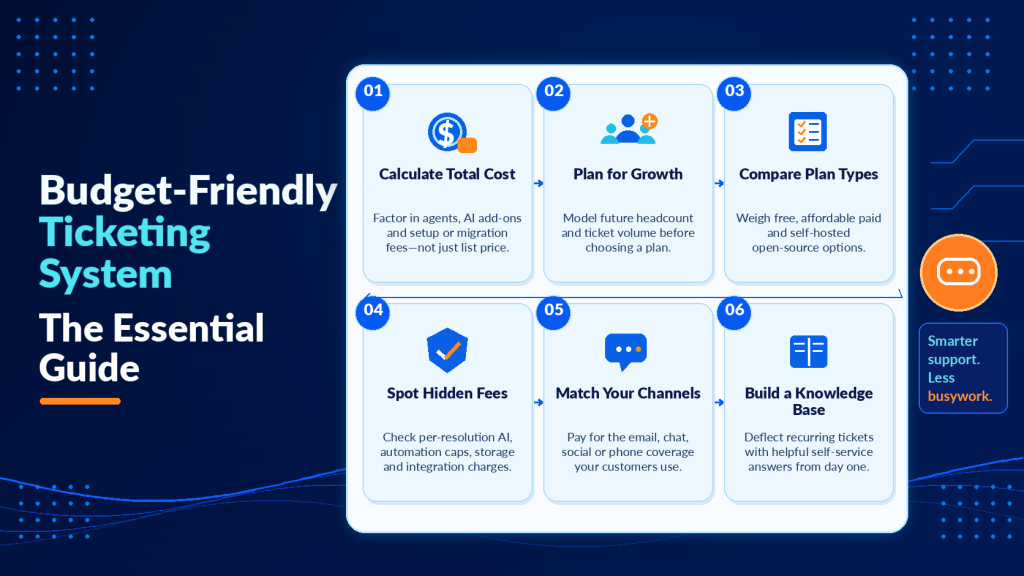
A budget-friendly ticketing system won’t save you money if it buries you in workarounds, missing features, and surprise invoices three months in. The real challenge is finding software that stays cheap as your team and ticket volume grow.
Most small businesses start with a shared inbox. That works until it doesn’t, usually around the point where two agents reply to the same customer or a request sits unanswered for a week.
The jump from inbox chaos to a proper ticketing system doesn’t require a big budget, but it does require knowing where the hidden costs live and which free plans actually hold up under real use. This guide walks through how to evaluate total cost of ownership, spot hidden fees before they hit your invoice, and configure a low-cost system so it scales without breaking your budget.
Key Points
- A genuinely affordable ticketing system keeps total cost of ownership low by factoring in per-agent pricing as you scale, the cost of add-ons like live chat or AI features, and any setup or migration fees.
- The gap between lower and higher per-agent pricing barely registers with one seat, but at ten agents you’re paying an extra $90 every month for features you may not need.
- Per-resolution AI fees are billed per interaction and at high volume this line item can exceed your base subscription cost.
- Free plans from SaaS providers typically cap you at two or three agents and limit automation rules, making them a legitimate starting point for solo founders and micro-teams but rarely surviving a growth spurt.
- Open-source tools like osTicket or FreeScout remove per-agent fees entirely, but the trade-off is you host and maintain the software yourself, which means server costs and some technical comfort.
- Every ticket you deflect with a self-service article reduces agent workload without adding cost, so build a knowledge base from day one by tracking which tickets repeat most frequently and writing articles targeting those exact questions.
What Is a Budget-Friendly Ticketing System?
The word “budget” gets thrown around loosely in software marketing. A tool priced at a low per-agent rate sounds affordable until you realize you need five agents, automation costs extra, and the email channel is the only one included at that tier.
A genuinely affordable ticketing system keeps your total cost of ownership low. That means factoring in per-agent pricing as you scale, the cost of add-ons like live chat or AI features, and any setup or migration fees.
Free vs. paid vs. open-source options
Free plans from SaaS providers typically cap you at two or three agents and limit automation rules.
They’re a legitimate starting point for solo founders and micro-teams, but they rarely survive a growth spurt.
Open-source tools like osTicket or FreeScout remove per-agent fees entirely. The trade-off is you host and maintain the software yourself, which means server costs and some technical comfort.
Paid plans in the affordable range hit the sweet spot for most small businesses. You get automation, multichannel support, and someone else worrying about uptime.

How to choose an affordable helpdesk tool without overpaying
Before comparing pricing pages, get clear on what you actually need. Overpaying usually starts with buying features you’ll never touch.
Step 1: Define your support channels
Do your customers reach you through email only, or do they also use live chat, social media, and phone?
An email-only support team doesn’t need an omnichannel platform. A simple shared inbox tool with ticket assignment and collision detection covers it.
If you handle requests across multiple channels, check whether multichannel support is included or gated behind a higher tier. This is the single most common source of unexpected upgrades.
Step 2: Estimate your agent count over 12 months
Pricing that looks reasonable at three agents can double your monthly spend at six. Run the math at your current headcount and where you expect to be in a year.
Here’s what that looks like in practice.
| Agents | Free Plan | Lower-tier paid | Higher-tier paid |
|---|---|---|---|
| 1 | Included | Low monthly cost | Moderate monthly cost |
| 3 | Included if within cap | Affordable monthly cost | Higher monthly cost |
| 5 | Upgrade required | Moderate monthly cost | Significant monthly cost |
| 10 | Upgrade required | Moderate monthly cost | Substantially higher monthly cost |
The gap between lower-tier and higher-tier per-agent pricing barely registers with one seat.
At ten agents, you’re paying substantially more every month for features you may not need.
Step 3: Audit for hidden costs before you commit
This is where most “affordable” tools stop being affordable. Watch for these line items that don’t appear on the main pricing page.
- AI or chatbot usage fees are billed per resolution or per conversation.
- Automation limits cap the number of rules or triggers per month.
- Storage or ticket archiving fees apply once you exceed a threshold.
- Integration costs are for connecting your CRM or e-commerce platform.
What changes on your invoice if you double your ticket volume next quarter? Ask the vendor directly. The answer tells you more than the pricing page ever will.

Best budget-friendly ticketing systems by business type
We won’t rank twelve tools and pretend they’re all equally good. Different teams have different needs, and the best pick depends on your situation.
For email-only support teams
If email is your sole channel, look at tools like Freshdesk’s free plan (up to two agents) or Zoho Desk’s free tier. Both handle ticket assignment, basic automation, and a simple knowledge base without charging a dollar.
The limitation is you’ll outgrow them fast if you add live chat or need reporting beyond the basics.
For multichannel small businesses
Teams juggling email, chat, and social media should look at paid tiers in the affordable range. Freshdesk’s Growth plan and Zoho Desk’s Standard plan both include multichannel routing and workflow automation at that price point.
One thing we’d push back on is paying for phone support integration if a small minority of your tickets come by phone. That feature alone can bump you to a higher tier on several platforms.
For internal IT help desks
Internal teams often need asset tracking and SLA management more than customer-facing chat widgets. Open-source options like GLPI or osTicket work well here because you control the deployment and don’t pay per-agent fees.
The catch is you need someone comfortable managing a server.
For growing client service teams
If you’re scaling from five to fifteen agents over the next year, prioritize tools with flat or predictable per-agent pricing. Evaluate how automation pricing scales alongside seats.
A system that charges per agent but includes unlimited automations often costs less at scale than one charging per agent with a per-automation cap.
Managing costs across your customer communication stack matters, too. The same budgeting discipline applies whether you’re evaluating help desk software or running a realistic cost-benefit breakdown for a B2B newsletter.

Hidden costs that turn cheap ticketing software expensive
We touched on this during the selection steps, but it deserves its own section because these traps catch teams repeatedly.
Per-resolution AI fees are the newest culprit. Several vendors now offer AI-powered ticket routing or auto-responses, then bill you per interaction. At high volume, this line item can exceed your base subscription.
Feature gating is another pattern. A tool might advertise a low starting price, but gate SLA tracking, customer satisfaction surveys, and custom reporting behind the next tier up.
You end up upgrading because you need basic management visibility, even though you have enough seats. Much like how realistic pricing breakdowns for newsletter agencies reveal costs that headline numbers hide, ticketing software pricing needs the same scrutiny.
Annual billing discounts also deserve a careful look. Yes, paying yearly saves on most platforms. But locking into twelve months before you’ve tested the tool with your full team is a gamble.
Start monthly, switch to annual once you’re confident.
Making the most of a low-cost ticketing solution
Buying the right tool is half the job. Configuring it well is the other half, and this is where budget tools either shine or fall apart.
Set up automation workflows early. Even basic rules like auto-assigning tickets by subject line or auto-closing resolved tickets after 48 hours save hours each week.
Most free and low-cost plans include at least a handful of automation rules.
Build a knowledge base from day one. Every ticket you deflect with a self-service article reduces agent workload without adding cost. Track which tickets repeat most frequently, then write articles targeting those exact questions.
And review your plan quarterly. Your needs at month one won’t match your needs at month nine.
Downgrading features you stopped using is just as valid as upgrading when you need more.
Frequently asked questions
What are the best ticketing systems?
The best ticketing system depends on your support setup. Email-only teams often do well with lightweight tools, multichannel teams should prioritize routing and automation, and internal IT help desks typically benefit from SLA and asset-focused platforms.
Which online ticket platform has the lowest fees?
The lowest fees are not always the lowest total cost. To find the true cheapest option for your team, compare how pricing changes with more agents, more tickets, and add-ons like integrations, storage, and AI usage charges.
Is there a free ticketing system?
Yes, there are free plans from SaaS help desks and free open-source ticketing tools you can self-host. Free plans are best for very small teams, while open-source can stay free per agent but usually requires time and technical effort to run reliably.
Does Microsoft have a help desk ticketing system?
Microsoft does not offer a single, dedicated help desk product that works like a typical ticketing platform out of the box. Many teams instead combine Microsoft tools with a purpose-built help desk, or use third-party ticketing apps that integrate with Microsoft 365.
How can I run a fair pricing test during a trial so I do not get surprised after launch?
Recreate a realistic week of support activity in the trial with the workflows you actually need. Ask the vendor to itemize what would change on your invoice at double your current volume and at your projected headcount in 12 months.
What are the most important questions to ask about AI features before enabling them in a low-cost help desk?
Ask how AI is billed, for example per conversation, per resolution, or per agent, and whether there are monthly caps. Also confirm what happens when you exceed included usage and whether AI can be disabled without breaking core workflows.
When does it make sense to choose an open-source ticketing system over a paid SaaS plan?
Open-source makes sense when per-agent pricing will become a major cost driver and you have the technical resources to host, secure, and maintain the system. If you cannot reliably manage updates, uptime, and backups, a paid SaaS plan can be cheaper in time and risk.
Putting budget-friendly ticketing into practice
The right ticketing system gives you predictable costs, room to grow, and features that match your actual support workflow. Start by mapping your channels and agent count, then run the 12-month pricing math before you commit to a platform.
Trial one or two options with realistic ticket volume and the workflows you’ll use daily. Ask vendors to itemize what changes on your invoice when volume doubles or headcount grows, because that visibility prevents surprise upgrades later.
Review your configuration quarterly. The tool that fits today may need adjustment in six months, and staying on top of that prevents both overpaying for unused features and outgrowing a plan that no longer serves you. Budget discipline in support software mirrors the same thinking you apply across your customer communication stack. When costs stay predictable and features stay aligned with real needs, your support operation scales without surprises.
Choose the right budget-friendly ticketing system for sustainable growth
A budget-friendly ticketing system should do more than save money on subscriptions. It should also reduce the time your team spends managing repetitive requests, assigning tickets, and responding to common customer questions.
That’s where Helploom comes in. Helploom combines ticket management, live chat, and AI-powered customer support to help small businesses handle more inquiries without continually adding support agents. Its AI agents are designed to resolve routine customer questions automatically, while your team focuses on issues that need a human touch.
Looking to reduce support costs without compromising customer experience? Explore Helploom and see how AI-powered automation can help you scale customer support without scaling your overhead.