

You know that feeling when a customer asks the same question for the tenth time this week? You’ve answered it before. You know the answer. But they can’t find it, so they’re asking again.
That’s why I built Help Center.
Why Help Center?
Most customers want to help themselves. According to Zendesk, 69% of customers prefer to solve issues on their own. But they can only do that if they can actually find the answers.
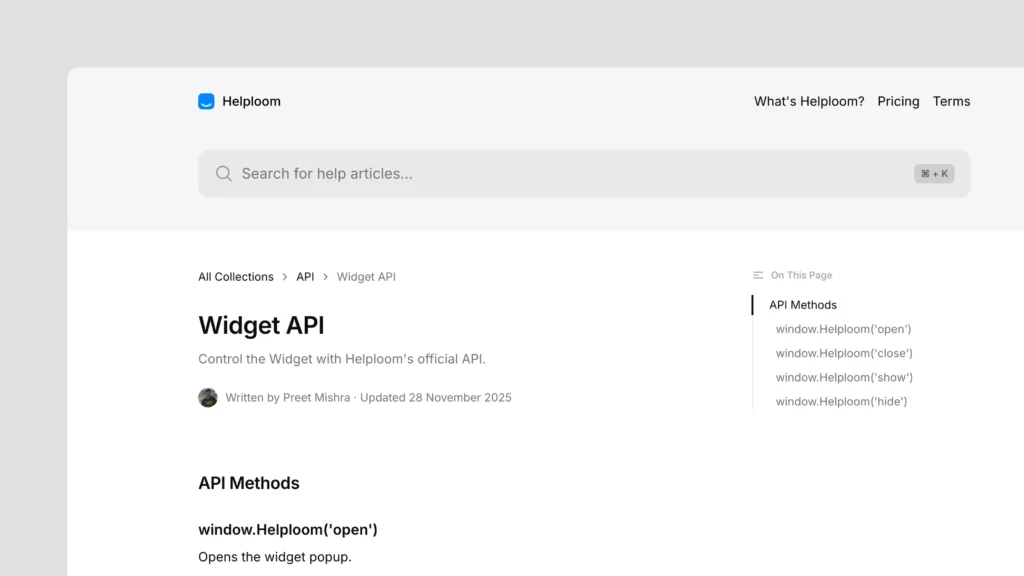
Traditional help centers are clunky, hard to search, and look like they were built in 2010. They’re not optimized for search engines, so even when customers Google or ChatGPT your product questions, they can’t find your documentation.
Help Center changes that. It’s built to help customers find answers fast, whether they’re searching your website or finding you through Google or ChatGPT.
What makes it different?
Create beautiful articles
Write articles with a Notion-like editor. Format content, add images, embed videos, and structure your documentation the way you want. No technical knowledge needed. Just write.
Your articles look professional and are easy to read. Customers actually want to use them.
Organize with collections
Group related articles into collections to help customers navigate and discover relevant content easily. Think “Getting Started”, “Billing”, “Troubleshooting”: whatever makes sense for your product.
Collections make it easy for customers to find what they need without getting lost in a sea of articles.
Make it yours
Customize the look and feel of your Help Center to match your brand. Make it feel like part of your product, not a generic documentation site.
When your help center looks like your brand, customers trust it more.
Powerful search
Customers can quickly find answers with instant search across all your help articles. They type what they’re looking for, and they get results instantly.
Track what helps
See which articles are most viewed and helpful. Understand what customers are searching for to improve your content.
When you know what customers are looking for, you can create better content. When you know which articles help the most, you can focus on what works.
SEO, LLMs? Optimized for all
Your help center is automatically optimized for search engines, helping customers find answers through Google and other search engines.
But it’s not just about Google. Your articles are also optimized for AI assistants and LLMs. When customers ask ChatGPT or Claude about your product, they can find accurate information from your help center.
How it works with your support
Help Center isn’t a replacement for human support. It’s a complement.
When customers can find answers themselves, they’re happier. When they can’t find answers, they reach out to you. But now, instead of answering “How do I reset my password?” for the 50th time, you’re helping with actual problems.
Your AI chatbot can also use your help center articles to answer questions automatically. Train it once, and it answers questions 24/7 using your documentation.
Getting started
Creating your first article takes minutes.
Start with the questions you answer most often. Create articles for those. Then add more as you go.
Your help center grows with you. Start small, add content over time, and watch as more customers find answers on their own.
The bottom line
Help Center is about giving customers the power to help themselves while making your life easier. When customers can find answers, everyone wins.
They get instant help. You get fewer repetitive questions. You focus on the issues that actually need human attention.
Try it today and see how much time you save when customers can help themselves.