
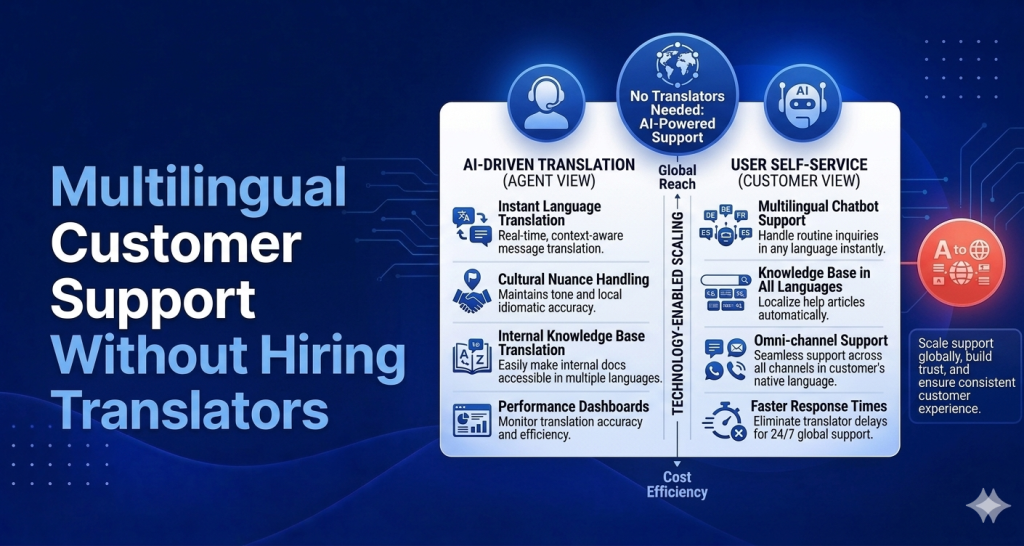
Your product just got users in Germany, Brazil, and Japan. Your support team speaks English. That gap — between a global user base and an English-only support operation — is costing you customers you don’t even know you’re losing. This guide walks through how to handle multilingual customer support for a small business without building a multilingual team.
Why Multilingual Support Matters More Than Most Small Businesses Realize
Non-English speakers churn faster without support in their language. This is not a hypothesis — it’s consistent with what support teams see when they run the data. Users who don’t get answers they understand tend to stop using the product quietly, without a dramatic cancellation email. They just leave.
The problem is compounded by the fact that when things go wrong, language is the first barrier. A German user who hits a bug and can only find an English help center article is not going to work through the translation problem. They’re going to assume the product doesn’t work for them and move on.
For small businesses, the cost of losing a customer to a language barrier is identical to losing one for any other reason. You’ve spent the acquisition cost. You’ve done the onboarding. You lose the revenue at the point where the customer needed help and couldn’t get it.
Multilingual support doesn’t require a team of translators. It requires a thoughtful setup that handles the most common questions in the most common languages before they ever reach a human.
The 4 Approaches to Multilingual Support
1. Translate Your Help Center Articles
The highest-impact, lowest-cost multilingual support move you can make is translating your help center. Here’s why: research consistently shows that 60-70% of support volume is deflectable — meaning users would find the answer themselves if it existed in their language. When your help center is English-only, that deflection doesn’t happen for non-English speakers. Everything goes to your inbox instead.
Translated help center articles don’t require perfection. They require accuracy on the things that matter: step-by-step instructions, pricing details, policy information. A translated help article at 85% fluency still deflects the question. An English-only article deflects nothing for a Japanese user.
Which languages to translate first is a data question. Look at where your users are coming from — your analytics will tell you. If 15% of your users are in Brazil and 3% are in Germany, translate Portuguese first. Prioritize by user share, not by the languages you personally find interesting.
2. Use AI That Responds in the Customer’s Language
Modern AI support agents can detect the language a customer is writing in and respond in that language — automatically, without any additional configuration on your end. A user writes in Spanish. The AI responds in Spanish. The conversation stays in Spanish until it’s resolved or escalated.
This is a fundamental shift from how multilingual support used to work. Previously, you needed either human translators or a system that routed non-English tickets to a queue that nobody could answer. Now, the AI handles the initial response in the user’s language, which means users in Germany or Brazil or Japan get an immediate, useful response instead of a delay while someone figures out how to translate their question.
This doesn’t replace translated help articles — it complements them. The AI can answer in the user’s language and link them to a translated help article when one exists.
3. Use Async Support (Not Live Chat) to Buy Time for Translation
If some of your multilingual tickets genuinely require human responses — complex technical issues, billing disputes, situations the AI can’t resolve — async support (email or ticketed responses) gives you time to translate before you reply.
This matters because live chat creates pressure to respond in real time. If your human team doesn’t speak the user’s language, live chat in that language is a bad experience. You can’t credibly run a live chat in a language you’re running through Google Translate in a separate tab.
Async support changes the dynamic. You receive the message, take 10-15 minutes to translate it properly using a good translation tool or professional service, draft a clear response, and send it. The user gets a high-quality response in their language. You’ve managed the expectation with an initial acknowledgment that you received their message.
For high-value users, this trade-off is worth making. For high-volume, low-complexity issues, handle those with translated help articles and AI first.
4. Partner With Support Agencies in Target Markets (Only at Scale)
Some companies, once they’ve reached meaningful scale in specific markets, partner with local support agencies who provide native-language support in that region. This makes sense when you have enough users in a specific market to justify it and when the complexity of your product requires genuine native fluency.
This is not a day-one solution. It’s not a first-hundred-customers solution. It’s a solution for when you have a meaningful business in a specific market and the economics of dedicated regional support make sense.
For most small businesses and early-stage SaaS products, approaches 1, 2, and 3 cover the vast majority of multilingual support needs for a fraction of the cost.
How Modern AI Handles Multilingual Queries Automatically
The AI support landscape has changed considerably in the last two years. The same underlying models that power tools like HelpLoom’s AI agent have strong multilingual capabilities built in. They read and respond in dozens of languages without separate configuration.
In practice, this means: a customer writes in French, the AI detects French, responds in French drawing from your English knowledge base, and the user never knows there was an English original involved. The quality is good enough for tier-one support — FAQ answers, troubleshooting steps, policy information — in the major world languages.
Where multilingual AI falls short: deeply nuanced or idiomatic communication, sensitive situations requiring cultural fluency, and extremely rare languages. For those situations, you need a human. But for the majority of support volume in the major global languages, the AI handles it well.
The practical implication: if you set up AI support with HelpLoom and your German users start writing in German, your AI responds in German. No extra setup. No translation layer. No German-speaking support hire required.
Help Center Translation: Which Languages to Prioritize
Start with your analytics. Go to your product analytics or website analytics and find where your users are located. Sort by country share. The countries in the top five that don’t primarily speak English are your first translation priorities.
A simple framework for prioritization:
-
More than 10% of users from a non-English speaking country: translate your five most-visited help articles immediately
-
5-10% from a non-English speaking country: translate your top three articles and monitor support volume from that region
-
Under 5%: let AI handle it for now, monitor for growth
Translation quality matters more for some articles than others. Your “getting started” guide and your billing FAQ need to be accurate. Your changelog doesn’t. Prioritize quality on the articles that directly affect user success and retention.
For translation itself, you have options at different price points: professional human translators for high-stakes content, AI-assisted translation with human review for medium-priority content, or pure AI translation for low-priority content. The cost difference between these approaches is significant, so match the quality level to the importance of the content.
What NOT to Do
Don’t paste Google Translate outputs directly into support replies. Users notice. The quality is inconsistent, the idioms are wrong, and it signals that you haven’t actually tried to support them in their language. If you’re going to use machine translation for human replies, use a better tool and take five minutes to review the output.
Don’t maintain English-only help docs for a global product. If you have meaningful user volume in non-English speaking markets and your help center is 100% English, you’re leaving deflection on the table. Every unanswered question in that market becomes an inbox ticket that slows you down.
Don’t promise live support in languages you can’t actually staff. Don’t show a German-language landing page with a live chat widget and then respond to German chat messages in English. The gap between expectation and reality is more damaging than just setting accurate expectations from the start.
Don’t wait until you have a “multilingual support strategy” document before doing anything. Translate your three highest-traffic help articles this week. Set up an AI agent that responds in the customer’s language. You’ll learn more in a month of running that setup than you will from a month of planning.
HelpLoom for Multilingual Support
HelpLoom’s AI agent handles multilingual queries automatically as part of the $59/mo plan. The AI detects the language, responds appropriately, and escalates to a human when it can’t resolve the issue — regardless of what language the conversation is in. The help center is structured to support multiple languages, and the sitemap.xml is included for SEO in each language you publish in.
This is meaningful for small businesses trying to support global users. You don’t need a translator on staff. You don’t need a multilingual support team. You need a help center in the right languages and an AI that can handle conversations as they come in.
For a SaaS startup or small business with users across multiple markets, this setup — translated help center plus AI support — covers the overwhelming majority of multilingual support needs at a cost that makes sense long before you have the headcount to cover it any other way.
Support Your Global Customers Without a Global Support Team
Translated help articles. AI that responds in the customer’s language. Async human backup for complex cases. That’s the multilingual support stack for a small business without a translation budget.
Start with HelpLoom — and stop losing customers to a language barrier you can remove this week.
FAQs
Q: Who is this guide for?
People evaluating better customer support systems.
Q: Can AI replace support teams completely?
Usually no. AI handles repetitive questions best, with humans handling escalation.
Need help support tooling? Explore HelpLoom.