
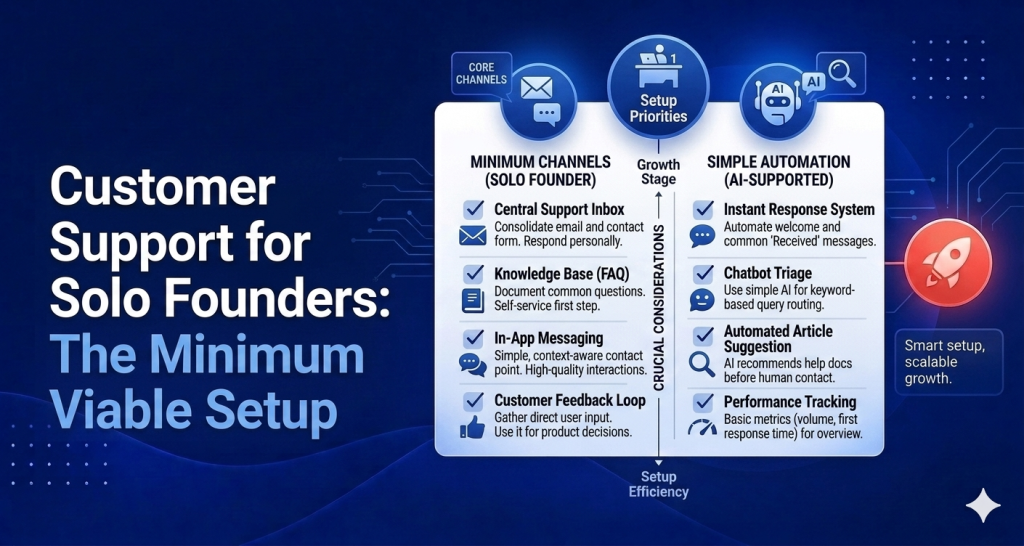
You’re a solo founder. You’re the CEO, the developer, the marketer, the salesperson, and now somehow also the support team. Every email that comes in is another context switch away from the work that actually moves the product forward. This guide is specifically for solo founders who need a customer support setup that doesn’t require a team to run — because you don’t have one.
Why You Need a Support System Even With 10 Customers
Ten customers doesn’t sound like a support problem. It doesn’t feel like one either — until you’re deep in a coding session at 2pm and you realize you haven’t checked your email since Tuesday, two customers are waiting on answers, and one of them has already posted in a community forum asking if the product is abandoned.
The issue isn’t volume. It’s that without a system, support is invisible until it becomes urgent. No inbox means no visibility. No help center means every question becomes a support ticket. No automation means you are personally bottlenecking every single interaction.
Ten customers with a bad support experience tells you nothing useful. Ten customers with a good support system gives you a feedback loop: what’s confusing, what’s breaking, where the onboarding falls apart. That feedback is the most valuable thing a solo founder can have.
The support system also scales you. Going from 10 to 100 customers without a system in place doesn’t mean linear extra work — it means chaos. Set it up while the volume is manageable. The overhead now is hours. The overhead later, without it, is weeks.
The 3-Part Minimum Viable Support Setup for a Solo Founder
You don’t need a team. You need three things working.
1. A Help Center That Answers Questions Before They’re Asked
The highest-leverage support tool for a solo founder is one that deflects questions entirely. That’s a help center.
Most of the questions you’ll get as a solo founder are the same questions asked by different people. How does billing work? How do I do X? What happens if Y? Every time you answer one of those in a personal email, you’ve spent three minutes on something you could have answered once in a help center article that’s available forever.
A help center also makes your product look considered. It signals that you’ve thought about your users’ experience beyond the product itself. For a solo product competing with funded teams, that matters.
The practical bar is low: five to ten articles covering your most common questions. You probably know what those questions are already. You’ve answered them. Write them down once.
2. An AI Agent That Handles the Repetitive Stuff
The second layer is an AI agent that can answer questions in real time, without you being involved. Not for complex questions — those need a human (you). For the simple, repetitive ones that don’t require judgment.
What’s your pricing? Is there a free plan? Can I export my data? How do I connect [integration]? These questions have definitive, writable answers. An AI agent trained on your help center can handle them instantly, at any hour, without you lifting a finger.
This is not a nice-to-have for a solo founder. It’s the closest thing you have to a support hire without the $3,500+/mo price tag. At $59/mo — the price of HelpLoom’s AI plan — an AI agent answers questions at 3am, covers weekends, doesn’t take vacation, and never misses an email because it was deep in a coding session.
The AI doesn’t replace you for hard questions. It handles tier one so that when something does reach you, it’s actually worth your time.
3. A Simple Inbox That Doesn’t Require a Full-Time Person to Manage
Your personal Gmail is not a support inbox. It doesn’t have status tracking, tagging, or any way to tell at a glance what’s been handled and what hasn’t. When you get back from a long work session, you’re reading through everything to figure out what still needs a reply.
A proper shared inbox — even if it’s just you using it — gives you structure. Conversations have statuses (open, closed, waiting). You can tag by issue type. You can see your backlog without excavating your email.
You don’t need anything complex. You need something better than Gmail. An inbox where all support conversations live, are trackable, and don’t get lost.
How to Write Your First 5 Help Articles in an Hour
Here are the exact five articles to write first. These cover the majority of questions for almost any SaaS or digital product.
Article 1: Getting Started — Walk through the first five minutes of using your product. What does a new user need to do first? Where do people get stuck? This is your onboarding doc.
Article 2: Pricing and Billing — What’s included in each plan? How does billing work? When is a card charged? What happens at upgrade or cancellation? Answer all of it here so you stop answering it in email.
Article 3: How to Do the Most Common Task — Every product has one thing that 80% of users are there to do. Write a clear step-by-step guide for that task. Include screenshots if you have them.
Article 4: Troubleshooting the Most Common Problem — What breaks most often? What do users try and fail at? Write the fix here. Link to it from your error messages if you can.
Article 5: How to Cancel — Write this one. It seems counterintuitive, but documenting cancellation clearly builds trust and reduces the number of aggressive churn-related emails you’ll receive. It also protects you from disputes.
One hour. Five articles. Most of your most frequent questions, answered before they hit your inbox.
Why AI Support Is the Solo Founder’s Best Hire
Think about what a junior support hire actually does in the first few months: they answer the same ten questions in slightly different ways, they work business hours, and they cost you $3,500 to $4,500 a month including benefits.
An AI agent trained on your knowledge base answers those same ten questions perfectly, works 24/7, covers every timezone your customers are in, never misses a shift, and costs $59/mo.
That’s not hyperbole — it’s the actual math. Before you’ve hit product-market fit, before you have stable support volume, the AI agent is almost always the right call. It buys you time to stay focused on the product. It means users get answers even when you’re building. And when a question is too complex or too sensitive for the AI to handle, it escalates to you — automatically — so nothing falls through.
At $59/mo, HelpLoom includes AI support with automatic escalation. You get the coverage without the headcount.
HelpLoom as the Solo Founder’s Support Stack
The solo founder’s support needs are simple but specific: everything in one place, no per-seat pricing, fast to set up, and low-maintenance to run.
That’s exactly what HelpLoom is built for. For $29/mo you get the shared inbox, help center, and live chat widget. For $59/mo you add the AI agent. Flat rate. Unlimited users. No per-agent fees — which means the day you bring on a contractor or co-founder to help with support, the price doesn’t change.
Setup is a copy-paste script. No engineering required. Under three minutes to get the widget running in your product. Joanna Sundharam at WisdomCircle went live in 20 minutes and attributed a direct conversion boost to it. That’s the kind of setup timeline a solo founder can actually act on.
HelpLoom works with React, HTML, Webflow, WordPress, Shopify, Framer, and Bubble. If that’s your stack, you’re covered.
Compare that to Intercom, which is per-seat plus usage fees and can cost hundreds a month before you have a meaningful support operation. Or Zendesk at $55/agent/month minimum. For a solo founder, those tools aren’t just expensive — they’re overbuilt. They’ll take more time to configure than they’ll ever save you.
What You’re Not Building Yet
You don’t need phone support. You don’t need a multi-channel inbox (Twitter DMs, Facebook Messenger, WhatsApp). You don’t need SLAs or ticket escalation workflows.
Those things make sense at scale. At 10-100 customers, they’re distractions. Build the three-part stack — help center, AI agent, shared inbox — and run it. Add complexity when your volume makes you add it, not before.
The Solo Founder’s Support Reality
Nobody is going to build your support system for you. That’s the reality of being solo. But it doesn’t have to be a second job. Done right, your support setup handles the majority of volume automatically, makes the rest manageable, and gives you back hours every week.
Five help articles. An AI agent. A real inbox. That’s all you need to go from “I am personally answering every email” to “support is handled.”
Set Up Support for Your Solo Business in an Afternoon
Free to start. No credit card. Three minutes to install. One afternoon to have a help center, AI agent, and shared inbox all running.
Start free at HelpLoom and build the support stack that works while you’re working on everything else.
FAQs
Q: Who is this guide for?
People evaluating better customer support systems.
Q: Can AI replace support teams completely?
Usually no. AI handles repetitive questions best, with humans handling escalation.
Need help support tooling? Explore HelpLoom.