
The AI support failure mode nobody talks about: a customer asks a question the AI can’t answer, the AI gives a vague or wrong response, and the customer is just… stuck. No human appears. No escalation happens. The customer waits, gets frustrated, and eventually churns — while the AI interaction sits in a log somewhere marked “resolved.” If you’re setting up AI-to-human handoff in your customer support system, getting this right is more important than almost any other configuration decision you’ll make.
Why AI Escalation Matters More Than AI Itself
Every AI support system has a confidence ceiling. Below that ceiling, the AI is helpful. Above a certain complexity threshold, the AI either doesn’t know the answer or gives an answer that sounds confident but is wrong. Both outcomes damage trust.
The handoff — the moment the AI recognizes it’s out of its depth and passes the conversation to a human — is where your support operation either builds or destroys user confidence. A smooth handoff that brings a knowledgeable human into the conversation with full context feels like good service. A broken handoff that drops the user into a void, or forces them to re-explain their entire problem from scratch, feels worse than no AI support at all.
Most discussions about AI support focus on accuracy rates, response speeds, and deflection percentages. Those metrics matter. But if your escalation is broken, your most frustrated users — the ones who most need a human — are the ones being failed.
The 4 Triggers That Should Always Escalate to a Human
1. AI Confidence Is Low
The AI doesn’t know the answer. This sounds obvious, but many AI support implementations don’t expose confidence scoring to users or use it to trigger escalation. They just let the AI produce a response regardless of how uncertain it is.
A properly configured AI system knows when it doesn’t know. When the AI’s confidence score falls below a threshold you set — say, it can only partially match the user’s question to its training data — it should escalate rather than guess. An honest “I’m not sure about this, let me connect you with someone who is” is dramatically better than a confident wrong answer.
Configure your AI to escalate on low confidence rather than hallucinate through it. This is the single most important escalation rule.
2. The Customer Has Expressed Frustration or Used Negative Language
Language signals matter. A user who writes “this is ridiculous,” “I’ve been dealing with this for three days,” or “I’m about to cancel” is not in a state where a policy answer from an AI is going to help them. They need a human who can acknowledge the frustration, validate that it’s real, and take ownership of resolving the problem.
AI sentiment detection is good enough to catch most of these signals. Configure your AI to flag conversations containing frustration markers — negative sentiment, explicit complaints, escalatory language — and pass those directly to a human. Don’t let the AI continue trying to answer a frustrated customer. The attempt will make things worse.
3. The Query Involves Billing, Refunds, or Account Security
These are categories where being wrong is expensive — for the customer and for you.
Billing questions often involve edge cases that require looking at account records, applying a policy with judgment, or making a decision about a refund. AI can answer general billing questions (“when does my subscription renew?”) but should not be making billing decisions (“I’ve approved your refund”) without a human in the loop.
Account security is similar. Password resets, suspected unauthorized access, account recovery — these need human verification and judgment. An AI that handles these incorrectly either locks out a legitimate user or helps an unauthorized one in. Neither outcome is acceptable.
Set hard escalation rules for billing, refunds, and security queries. Don’t let the AI try to handle them. Route them directly.
4. The Customer Explicitly Asks for a Human
“Can I talk to a real person?” is an escalation trigger. So is “I want to speak to a human,” “please transfer me,” or “is there someone I can actually talk to?”
This one seems obvious, but it’s worth stating: when a customer asks to speak to a human, the AI should immediately stop attempting to resolve the issue and initiate an escalation. It should not try one more response before doing so. It should not ask the user to confirm that they really want a human. It should acknowledge the request and escalate.
Failing to escalate when a customer explicitly asks is one of the most damaging things an AI support system can do. It tells the user that their request doesn’t matter. Don’t let the system make that call.
What Good Escalation Looks Like
When the escalation trigger fires, this is what the customer should experience:
The AI acknowledges it’s passing the conversation to a human. It doesn’t disappear — it says something like: “I want to make sure you get the right help here. I’m connecting you with a team member who can look into this directly. They’ll have the full context of our conversation.”
A human receives the conversation with everything they need to pick it up without re-asking anything. The conversation thread, the customer’s original question, what the AI tried, why it escalated. Full context, immediately available.
The human acknowledges the customer quickly — even if they can’t resolve it immediately. “I’ve picked up your conversation and I’m looking into this now” is enough. The customer knows a human is on it.
The resolution follows, delivered by a person who understands the full context.
That’s it. No gaps. No cold starts. No “could you explain what you mean by that again?”
What Bad Escalation Looks Like
The AI gives a vague non-answer and the conversation goes silent. The customer waits. Nobody shows up.
Or: the AI fires off a generic “we’ll get back to you” auto-reply and the conversation sits in a queue with no context. The human who eventually picks it up reads only the last message, asks clarifying questions the customer already answered, and the user has to re-explain the entire situation.
Or: the escalation is “working” technically — the ticket is created, the conversation is routed — but there’s no acknowledgment to the customer. From their perspective, they’ve been ghosted by a machine.
These failure modes erode trust faster than any AI response accuracy problem. The customer’s experience of the escalation is their experience of your company in the moment they most need you.
How to Configure Escalation Rules in Practice
The specific configuration depends on your tool, but the framework applies universally.
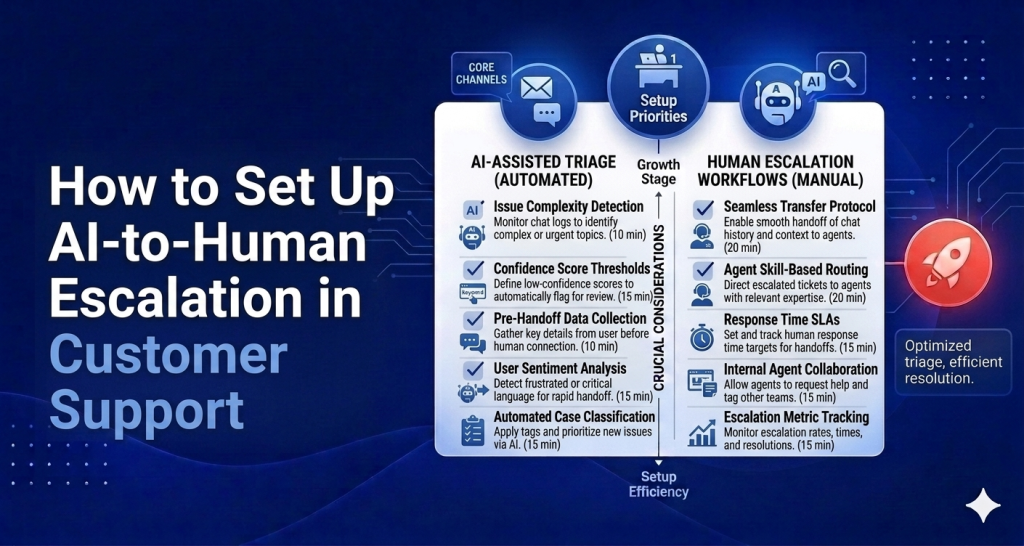
Step 1: Define your escalation triggers. List the conditions that should always escalate: low AI confidence, frustration language, billing/refund topics, security topics, explicit human requests. Start with these five categories.
Step 2: Set thresholds where applicable. For confidence-based escalation, decide on the threshold. 70% confidence? 60%? Lower thresholds escalate more (safer, more human load). Higher thresholds deflect more (more efficient, higher risk of AI errors slipping through).
Step 3: Design the escalation message. Write what the AI says when it escalates. It should be warm, specific, and honest. “I’m not confident I have the right answer here” is better than “Our team will be in touch.” The former acknowledges the AI’s limitations; the latter sounds like a brush-off.
Step 4: Ensure context transfer. Confirm that your system passes the full conversation thread, not just the last message, to the human agent. Test this explicitly. Send a multi-message conversation through your AI, trigger an escalation, and check what the human agent sees.
Step 5: Set a human acknowledgment expectation. Decide how quickly a human should acknowledge an escalated conversation. For most SaaS products, two to four hours during business hours is a reasonable target. Whatever your target is, be consistent about meeting it.
Step 6: Test every trigger. For each escalation trigger you’ve defined, send a test conversation that should trigger it and confirm the escalation fires correctly. Don’t assume the configuration is working — verify it.
HelpLoom’s Escalation Model
HelpLoom’s AI agent on the $59/mo plan escalates automatically when confidence is low. When the AI can’t produce a reliable answer, it flags the conversation and routes it to the shared inbox with full context intact — the complete conversation thread, the customer’s original question, and the escalation reason.
The human agent who picks it up sees everything. There’s no blank handoff. The customer doesn’t have to re-explain.
HelpLoom also escalates on explicit human requests. If a customer says they want to talk to a person, the AI acknowledges it and routes immediately. The escalation message is configurable so it reads naturally in the context of your product and tone.
For founders and small teams running lean support operations, this is the model that makes AI support safe to deploy without a large human team behind it. The AI handles what it can confidently handle. When it can’t, it gets a human involved — and it does so in a way that doesn’t create a worse experience than if there had been no AI at all.
The Handoff Is Where Trust Is Built
Users don’t expect AI to be perfect. They expect to be taken care of. When something goes wrong with an AI interaction and a human appears smoothly, with context, ready to help — that experience often lands better than a flawless AI interaction. It shows the company was paying attention.
When the AI gets stuck and nothing happens, the failure compounds. Not only did the user not get help, they can now see that nobody is watching.
Get the escalation right. It’s the most important thing in your AI support setup that nobody is talking about.
Set Up AI Support With Smart Human Escalation
HelpLoom handles both for $59/month — AI that answers what it can, escalates what it can’t, and passes full context to your human team automatically.
Start today and have AI-to-human escalation running before your next support ticket comes in.
FAQs
Q: Who is this guide for?
People evaluating better customer support systems.
Q: Can AI replace support teams completely?
Usually no. AI handles repetitive questions best, with humans handling escalation.
Need help support tooling? Explore HelpLoom.